

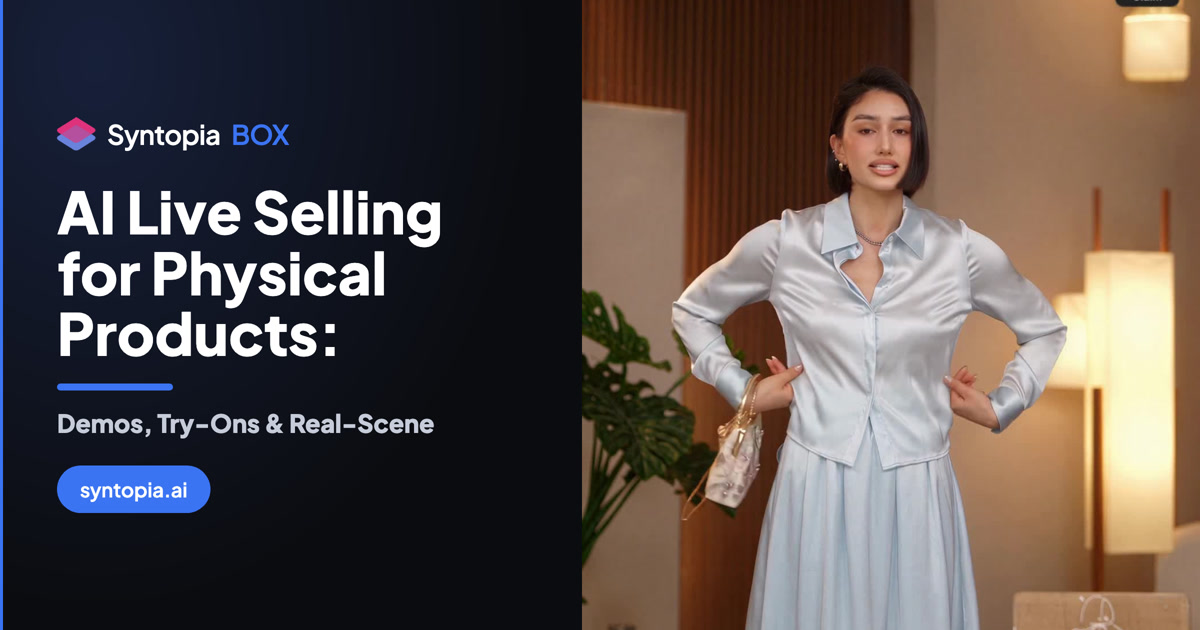
AI live selling for physical products has one hard requirement that software selling does not: buyers need to see the thing. They want the fabric held up to the light, the shoe turned over, the bottle shown close enough to read the label. A static talking-head avatar that never moves can read a script all day and still not sell a single jacket.
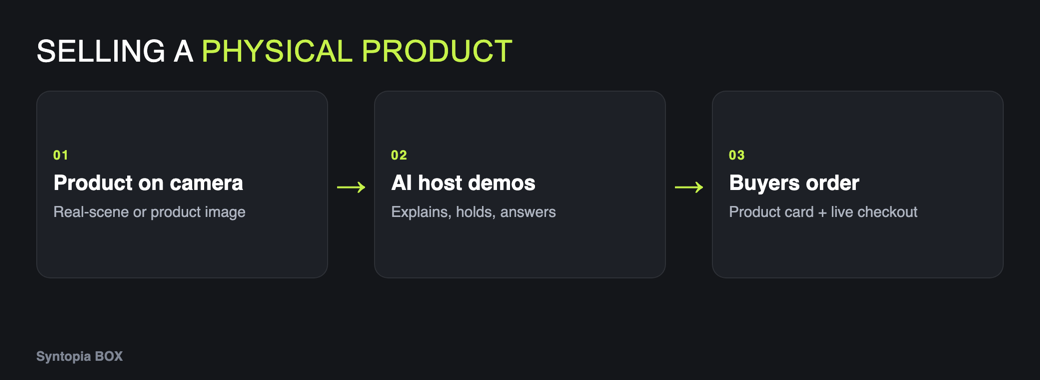
That is the exact gap Syntopia BOX is built to close. Its AI host can hold your products and wear your clothes and show them up close — and when the item is better off real, you can point a live camera straight at it and let the AI voice do the talking instead.
This guide covers the three practical ways to put a physical product on screen in a Syntopia live stream: an AI host that holds and demos it, a Real-Scene camera on the real goods, and the product pop-up cards and buyer-question handling that turn a demo into a sale.
- Syntopia’s AI digital human can hold, wear and show products up close — it was the single most-requested feature, and it is what makes an AI host usable for physical goods, not just explainer scripts.
- For food, retail shelves and hands-on demos, Real-Scene Live Stream points a real camera at the real product with an AI voice selling — no avatar on screen, no deduplication needed.
- Product cards pop up automatically when the product name is mentioned, and a knowledge base of up to 20,000 characters lets the host answer sizing, shipping and returns questions live.
- All of this runs from Syntopia BOX, an on-premise Windows app, into TikTok LIVE Studio or any supported platform’s app.
Why physical products need more than a talking head
Most AI avatar tools make a presenter that stands in one spot and speaks. That is fine for a course intro or a software walkthrough. It falls apart the moment a viewer asks “can you show me the back?” — because the avatar has nothing to show and no way to show it.
A Syntopia AI host behaves much more like a real person on camera. It turns to the side, sips water, can walk out of frame and back, cover its mouth, and — the part that matters here — hold your product up close so viewers see it in the host’s hands. It can also wear your clothes, which is why apparel sellers were the ones asking loudest for it.
When even a lifelike avatar isn’t the right answer — a steaming dish, a textured rug, a demo that has to be real — you switch the picture source instead of the host, and keep the same AI voice and chat engine running behind it.
9.5
9.3
8.2
7.8
7.0

How AI live selling for physical products works in Syntopia
Whichever route you pick, the plumbing is the same and you set it up once. Syntopia BOX creates the host and sends two things into your live app: a picture (through a virtual HD Camera) and a voice (through VB-Audio Virtual Cable). You build a live room, add your products, and the host sells from a script you write or one the AI writes from the product’s name, price and selling points. The three physical-goods routes below only change what that picture shows.
| Route | What’s on screen | Best for | OBS needed? |
|---|---|---|---|
| AI host holds it | AI digital human holding, wearing or showing the product up close | Apparel, accessories, packaged goods, anything hand-held | No |
| Real-Scene | A real camera on the real product; AI voice sells, no avatar | Food, retail shelves, large or textured items, live demos | No |
| Human Takeover | A real person on camera; BOX moves their mouth to the script/answers | When you want a real presenter but AI-driven talk and chat | No |
Option 1 — The AI host holds, wears and shows it
This is the default digital human stream, and it is the one that lets an AI host hold a product demo the way a human seller would. You create the host from a short training video, build a live room, and the avatar presents your products on camera.
The motion that makes a demo believable
Syntopia’s avatar does not just stand still. It moves like a real presenter — turning to the side, taking a rest, walking out of frame and back — and crucially it can hold your product up close and wear your clothes to show them off. That single capability is what separates a usable live-selling host from a decorative talking head.
Wears your clothes
Turns, rests, re-enters frame
Shows, doesn’t just describe
Setting up a hold-and-show room
In the live-room editor you work across the Script, Scene, Interaction and Settings tabs, with Host, Background, Props and Camera controls along the bottom. Add your product, then write the script in Standard Mode for exact brand wording, or let AI Stream Mode write it from the product’s name, price and selling points when you have many items and no time to script each one.
To keep a long-running stream from sounding like a loop, split the script into 300–500 character segments and run Variation on each, so the host rewords the same pitch differently on every pass. During the stream the system also picks one line at random from each set of {curly brackets} and one word from each [square brackets], so no two run-throughs are identical.
- Train the avatar’s look so the garment reads clearly, then let the host wear and turn the item on camera.
- Use a second voice — the assistant — for “and it’s machine-washable” style asides: text in (round brackets) is spoken by the assistant while the host rests.
- Put sizing, fit and care details in the knowledge base (below) so the host answers “does it run small?” without you typing.
Option 2 — Real-Scene: point a camera at the real product
Some products sell themselves better in the flesh: food being plated, a rug’s pile, a gadget actually working. Real-Scene Live Stream puts the real product on camera with an AI voice doing the talking, and no avatar on screen at all.
Real-Scene setup, step by step
Connect a webcam, or a camera plus a capture card, pointed at your products — good lighting genuinely matters here. Then:
- Create a New Livestream → Real Scene (no host avatar).
- Add your products and scripts, and choose a voice in Settings.
- Click Go Live Now.
- In TikTok LIVE Studio, add the real camera as the video source and set Microphone = CABLE Output.
Because it is a genuine live camera, no deduplication is needed. This is the route built for food, retail and hands-on product demos.
When the presenter should be real: Human Takeover
If you want a real person holding and demoing the product but still want the AI to write and answer, use Human Takeover. You sit in front of the camera, viewers see the real you, and BOX moves your mouth to the script and the AI’s live answers even though you are not the one speaking. Set the PC camera to 1920×1080, build the room, click Go Live Now, then Human Takeover (top-left), pick the camera and wait about 30 seconds. In this mode the face on screen is a real human; the AI only drives the lip-sync and the talking.
Option 3 — Product cards and answering buyer questions
Showing the product is half the job; the sale happens when buyers’ questions get answered fast. Syntopia handles both automatically.
Product pop-up cards
Add products to the live room and attach product cards that pop up when the product name is mentioned in the stream. As the host (or the recording) talks about an item, its card appears on screen — so the thing being described and the thing a viewer can tap line up in real time.
Smart Live Chat on sizes, shipping and returns
Turn on Smart Live Chat in the AI Chat tab and an LLM answers chat questions live from your custom knowledge base — up to 20,000 characters of prices, sizes, shipping, returns and your best answers to common questions. You choose who answers with Live Chat Method: the Host speaks it out loud, a Chat message replies in text, or the Assistant voice handles it. Tick one, two or all three. The better your knowledge base, the better the answers.
Proactive nudges that drive the cart
Proactive Live Chat welcomes new viewers, asks for follows and likes, and nudges people to buy — on by default, and you customise the wording in Engagement Prompts. Connect an AI model (OpenAI, DeepSeek or similar) under AI model so the host can reason over the knowledge base when it replies.
Which setup for which product
All five live types and both modes route the same AI voice and Smart Live Chat, so you can match the picture to the product without rebuilding your room from scratch. For the full step-by-step on every type, see the Syntopia BOX complete guide; for plans and hours, see the Syntopia pricing page.
Frequently asked questions
Can an AI avatar actually hold and show my product on a live stream?
Yes. Syntopia’s AI digital human can hold your products and wear your clothes and show them up close, and it moves like a real presenter — turning to the side, resting, and stepping out of frame and back. It was the most-requested feature precisely because it lets an AI host demo physical goods instead of only reading a script.
How do I demo a physical product on camera without an avatar?
Use Real-Scene Live Stream. Point a webcam, or a camera plus a capture card, at your real products with good lighting, create a New Livestream and choose Real Scene (no host avatar), add products and a voice in Settings, click Go Live Now, then add that camera as the video source in your live app with Microphone = CABLE Output. An AI voice sells while viewers watch the real product. No deduplication is needed because it is a live camera.
Do product cards pop up automatically during the stream?
Yes. You add products to the live room and attach product cards that pop up on screen automatically when the product’s name is mentioned, so the item being described matches what viewers can tap and buy.
Can the AI answer questions about size, shipping and returns?
Yes. Turn on Smart Live Chat and build a custom knowledge base of up to 20,000 characters covering prices, sizes, shipping, returns and common questions. An LLM answers chat questions live from it, and you choose whether the host says the answer out loud, replies in text, or lets the assistant voice handle it.
What is the best Syntopia live type for clothing and try-ons?
The digital human stream, because the AI host can wear your clothes and show them up close while turning on camera. Put fit and care details in the knowledge base so the host answers questions like “does it run small?” live, and use the assistant voice for quick asides while the host rests.
