

Short answer: comparing Syntopia vs Synthesia for AI live selling is really comparing two different jobs. Synthesia makes finished AI avatar videos — you type a script, it renders a polished clip you download. Syntopia BOX runs a real-time, interactive AI live host that goes live on a marketplace and answers your buyers while the stream is running. If you are searching for Synthesia for AI live selling, the honest answer is that it is a video-generation tool, not a live-streaming one.
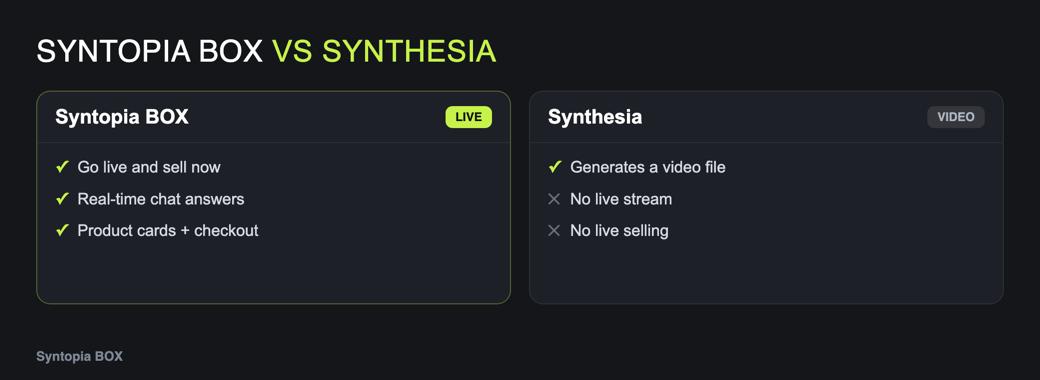 Synthesia for AI live selling: Real-Time vs Video Generation — how it works in Syntopia BOX” style=”width:100%;max-width:1040px;height:auto;border-radius:12px;border:1px solid #e7e7e7″ loading=”lazy”>
That difference matters most at the exact moment a sale happens. A finished video plays the same way for everyone and can’t react to a question in the chat. Live selling is the opposite: a buyer types “does this fit a size 12?” and expects an answer in the next ten seconds, for hours on end.
Below we lay out what each tool is built for, a side-by-side comparison on the things live selling actually needs, and clear guidance on when to pick which — including when to use both.
- Synthesia is an AI video-generation platform: script in, finished avatar video out. It is genuinely excellent for training clips, explainers and product videos you embed or post.
- Syntopia BOX is an on-premise Windows app that runs a real-time AI live host — it streams to TikTok Shop, Shopee, YouTube and 11 more platforms and answers viewers in the chat as the stream runs.
- Live selling needs two-way, real-time interaction and hours of continuous streaming — that is the gap a rendered video can’t fill.
- Many sellers use both: Synthesia for evergreen product videos, Syntopia BOX for the live stream that converts in the moment.
What each tool is actually built for
Synthesia
Synthesia is a cloud AI video-creation platform. You write a script in your browser, choose an AI avatar and a voice, and it renders a finished, studio-quality video you can download, embed or upload. That makes it a strong fit for things that don’t change in real time: onboarding and training videos, how-to explainers, internal comms and polished product videos. It has also shown interactive-avatar features in beta. What it does not do is go live — the output is a rendered file, so it can’t stream to a marketplace or reply to a live chat on its own.
Syntopia BOX
Syntopia BOX is an on-premise Windows application you install and run on your own PC. It builds an AI digital human host, then streams that host’s picture and voice straight into your live-selling app on TikTok Shop, Shopee, YouTube and 11 more platforms. The host reads the chat and answers viewers in real time — by name, using your product knowledge base — while the AI rewrites every line on the fly so no two minutes sound the same. You can clone a voice and, with V10, train it to sell in any of 600+ supported languages (a short sample per language), or use ready-made voices, and a real person can take over on camera at any moment with Human Takeover (the person is real; BOX only drives the lip-sync).
Syntopia vs Synthesia for AI live selling, compared
| What live selling needs | Syntopia BOX | Synthesia |
|---|---|---|
| What it produces | A real-time, interactive live stream | A finished, pre-recorded video file |
| Answers viewers live | Yes — reads the chat and replies in real time from your knowledge base | No — a rendered video plays the same for everyone (interactive avatar in beta) |
| Goes live on marketplaces | Yes — TikTok Shop, Shopee, YouTube + 11 more | Not a live tool — you export the video and post it yourself |
| Session length | Hours of continuous live selling | The length of the clip you render |
| Script behaviour | AI rewrites every line on the fly, so no two minutes repeat | The script you type is rendered once and fixed |
| Voice & languages | Clone a voice; train a V10 voice per language (600+ supported), or ready-made voices | AI avatar voices in its supported languages |
| Real person on camera | Human Takeover — real presenter, BOX drives the lip-sync | Not applicable (it is a video generator) |
| Where it runs | On-premise Windows app on your own PC | Cloud, in the browser |
| Scaling | Hundreds of concurrent live rooms by adding PCs + Syntopia BOX accounts | Render as many videos as your plan allows |
Comparison reflects each tool’s core purpose: Synthesia is a video-generation platform and Syntopia BOX is real-time AI live-selling software. Synthesia’s own features and pricing change over time — always confirm the current details on its website.
Fit for live selling specifically
9.6
3.0
Why real-time interaction decides live sales
A pre-recorded video is finished the moment it renders. That is perfect when the message never changes — a product explainer, a how-it-works clip, an ad. But a live sale is a conversation: viewers ask about sizing, shipping, ingredients and price, and whoever answers fastest tends to win the order. A rendered clip can’t take that question, which is why a video-generation tool can’t run a live-selling room on its own.
Syntopia BOX is built around that conversation. The host reads comments and answers them out loud (or as a chat reply, or through an assistant voice), using a knowledge base of up to 20,000 characters you fill with prices, sizes, shipping and returns. It also keeps the stream looking alive — the avatar turns, holds the product to camera, sips water and steps in and out of frame — so the room never reads as a static loop.
Synthesia hands you a finished video. Syntopia BOX runs the live conversation that turns a viewer into a buyer.
What this means for platform rules
Marketplace policy is the other reason the distinction matters. TikTok Shop and Shopee don’t ban AI hosts — they ask that an AI live interacts with viewers in real time and is clearly labelled as AI. A looped recording or an AI voice that never answers is what gets flagged. An interactive AI host that replies to the chat live and carries the platform’s AI label is exactly the kind of stream those policies describe.
Because Syntopia BOX answers in real time and lets you switch on the platform’s AI-generated-content label, it fits that requirement by design. A posted video made in any video tool is governed by the rules for posted content, not live content — a separate question from running a compliant live-selling room.
Which should you choose?
If your goal is live selling, pick the tool built for it. Syntopia BOX runs on your own PC and starts from $2.26/hour; you can see the full plan line-up on the Syntopia pricing page. And because BOX can also turn your avatar into short-form videos for your feed and product pages, it covers part of the recorded-video job too — though a dedicated generator like Synthesia remains a strong, purpose-built choice for polished studio clips.
Frequently asked questions
Can Synthesia do AI live selling or go live on TikTok Shop?
No. Synthesia is a video-generation platform — it renders finished AI avatar videos that you download, embed or post. It does not stream to a marketplace or answer a live chat on its own. For a live stream that interacts with buyers in real time, you need live-selling software such as Syntopia BOX.
What is the main difference between Syntopia BOX and Synthesia?
Synthesia produces a finished, pre-recorded AI avatar video from a script. Syntopia BOX runs a real-time interactive AI live host that streams to TikTok Shop, Shopee, YouTube and more, and answers viewers in the chat while the stream is running. One is a video generator; the other is live-selling software.
Is an AI live host even allowed on TikTok Shop and Shopee?
Yes, when it interacts with viewers in real time and is clearly labelled as AI. Platform policies flag fake lives — loops, recordings and AI voices that never answer — not interactive, disclosed AI hosts. Syntopia BOX answers the chat live and lets you switch on the platform’s AI-content label.
Does Syntopia BOX also make short videos like a video generator?
Yes. Syntopia BOX can turn your AI avatar into short-form videos for your feed, ads and product pages. Its core job is still real-time live selling, so a dedicated video tool like Synthesia can still be the better pick for polished, standalone studio clips.
Can I clone a voice, and what languages can it speak?
With Syntopia BOX, a few seconds of clear audio is enough to clone a voice, or you can use a ready-made one. V10 voices support 600+ languages; to sell in a specific language you record a short sample in that language, train a V10 voice on it and write your script in that language, so the host speaks it in your own voice. The most common languages come pre-loaded when you set up a stream.
How much does Syntopia BOX cost compared with a video tool?
Syntopia BOX starts from $2.26/hour and runs on your own PC; the full plans are on the Syntopia pricing page. A pro human live host in the West typically costs around $100–200/hour. Synthesia prices its video plans separately — check its website for the current figures, as the two tools are priced for different jobs.
