


Beauty is the category shoppers most want to see before they buy — the true shade, the finish, how a product sits on skin. AI live selling lets cosmetics brands demonstrate that on camera, on repeat, without burning out a human presenter. This guide shows how beauty sellers build an AI live room in Syntopia BOX: what to swatch and demo, how to light and style the avatar, how to write a shade-led script, and how to keep rooms live around the clock.
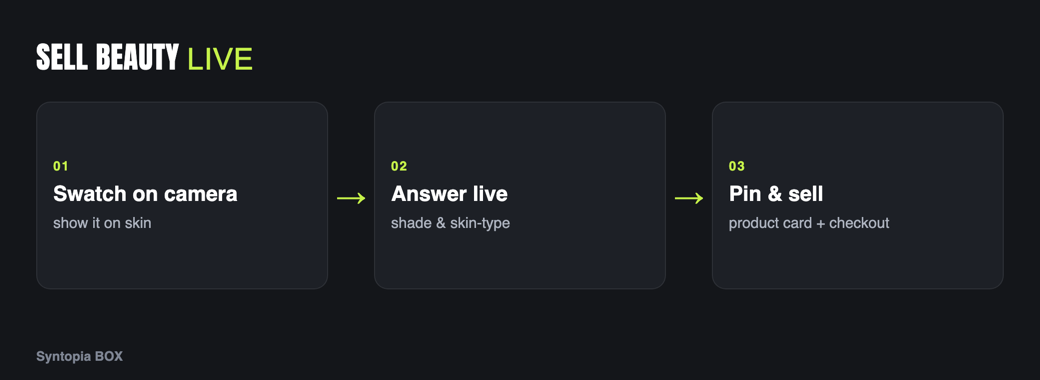
- Beauty buyers decide on shade, finish and texture — things only a live demo can show honestly.
- A trained AI avatar can hold products to the lens and show swatches look after look.
- Let smart chat answer “what shade for my skin tone?” instantly, and pin shade and price to on-screen cards.
- Light for true colour — accurate shade on camera is the single biggest driver of kept orders.
- Run shade-walkthrough streams on TikTok, YouTube and Shopee, with many rooms live at once.
Why live selling converts for beauty
Beauty is an inspection category. A lipstick’s listing can call a shade “rosewood”, but the shopper wants to see it against skin, under real light, next to the shade above and below it. Foundation listings promise a finish; buyers want to watch it go on and settle. This is why beauty was one of the first categories to explode in live commerce — the format answers the exact doubt that stops the sale.
The constraint has always been that a human demonstrator can only swatch so many products before fatigue shows, and a brand with a full shade range cannot staff a live walkthrough for every line. An AI host changes the maths: a trained AI avatar can swatch, demonstrate and answer for hours, so every collection, every shade family and every market can have its own continuous room.
There is a second reason beauty rewards the live format: discovery. Many shoppers do not know which product or shade they want until they see it demonstrated, so a live room doubles as a styling consultation. An AI host that can run that consultation continuously turns passive browsers into guided buyers, and every doubt answered on air is one fewer reason to close the tab. For a category where indecision is the main thing standing between a browse and a purchase, that guided, always-available demonstration is the whole advantage.
What to demo on camera
A beauty stream earns trust by showing, honestly, what the product does. Structure the demo around the doubts that drive returns:
- Shade and swatch. Swatch on skin, show the shade name, and place it next to neighbouring shades so viewers can self-select.
- Finish and texture. Show matte versus dewy, how a cream melts in, how a powder sits — the qualities a photo flattens.
- Application. Demonstrate the actual steps, so a shopper knows the product will work for them, not just a professional.
- True colour under light. Name the real shade and show it in even light; mismatched colour on camera is the biggest return driver in cosmetics.
A trained Syntopia BOX avatar can hold each product up to the lens and show it in use, so swatches and finishes are real demonstrations. The mechanics of presenting physical items are covered in AI live selling for physical products.
Avatar & scene tips for cosmetics
- Light for accurate shade above all. Soft, even, colour-neutral light is non-negotiable in beauty — it decides whether the shade a viewer buys matches the shade they receive. Shoot your training footage under the same conditions.
- Match the avatar to your audience. Train hosts across skin tones so shoppers can see shades on skin like their own; you can train several avatars, each with its own voice, and rotate them by collection.
- Keep the set clean and close. Beauty rewards tight, close-up framing on hands and face. A simple vanity or studio backdrop keeps the product the subject.
- Pin shade and price. Put the exact shade name and price on the product card so the avatar never misstates them and the basics are always on screen.
Common mistakes to avoid
Three errors cost beauty streams the most sales. The first is bad light: a warm or coloured bulb shifts the shade on camera and all but guarantees returns, so colour-neutral lighting is worth more than any other upgrade you can make. The second is talking over the swatch — viewers want a quiet beat to actually see the colour settle on skin, not a wall of patter. The third is leaving the shade name off screen; if a viewer cannot read the exact shade on the pinned card, they will guess, and a guessed shade is a returned shade. Fix those three and most of the stream takes care of itself.
Script & offer structure
Run beauty streams as a shade or routine walkthrough — short looping segments that each stand alone:
| Beat | What the avatar does | On screen |
|---|---|---|
| Introduce | Names the product and who it suits. | Pin the product card. |
| Swatch | Swatches on skin, names the shade. | Shade name on card. |
| Apply | Demonstrates application and finish. | Close-up of texture. |
| Match | Helps viewers self-select a shade. | Smart chat replies. |
| Offer | Names the deal and moves to the next shade. | Checkout prompt. |
Use beauty-native offers: a shade bundle, a routine set, or a gift-with-purchase while stock lasts. Let smart live chat handle the flood of “what shade for warm undertones?” and “is it good for oily skin?” questions in your host’s voice. Keep all prices on the pinned card and in the shop, following the pricing page, never improvised on air.
Beauty advertising is closely watched. Have the avatar describe shade, finish and texture — what the shopper can see — and avoid unprovable skincare or “results” claims on air. Pair this with live moderation so the host stays on approved phrasing.
Platforms that fit beauty
- TikTok — the dominant beauty-discovery platform; short, punchy shade reveals and trend tie-ins.
- YouTube — fuller routines, tutorials and launch events where viewers watch longer.
- Shopee — marketplace buyers comparing value across a shade range.
Syntopia BOX can drive a room on each; tailor the pace — fast reveals for TikTok, full routines for YouTube, clear value for Shopee.
Selling 24/7 across many rooms
Beauty demand spans every time zone, so continuous coverage is the payoff. Your AI host does not tire, so shade walkthroughs can run overnight and across markets, and because Syntopia BOX scales with the PCs and accounts you add — with no fixed cap on rooms — you can run a different line, market or language in each room at once. One operator oversees many rooms and takes over when a stream needs a human touch. Plans are on the pricing page. If you also sell skincare-adjacent wellness items, see the sibling guide AI live selling for supplements & wellness for its stricter claims guidance.
Frequently asked questions
How does AI live selling work for beauty and cosmetics?
You train an AI avatar in Syntopia BOX, then build a live room where it swatches products on skin, demonstrates finish and application, and names each shade while pinned cards carry the shade and price. The AI runs the stream continuously and answers shade-matching questions live in your host’s voice.
Can the AI avatar swatch and demonstrate products on camera?
Yes. A trained Syntopia BOX avatar moves like a real person and can hold products to the lens and show them in use, so swatches and finishes are genuine demonstrations. Even, colour-accurate lighting in your training and live footage is what keeps those swatches true to the real shade.
How do I keep beauty claims compliant on a live stream?
Have the avatar describe what a viewer can see — shade, finish, texture — and avoid unprovable skincare or results claims. Live moderation keeps the host on approved phrasing, and a human operator can take over at any time if a question strays into claims you should not make on air.
Which platforms work best for beauty live selling?
TikTok leads beauty discovery with short shade reveals, YouTube suits fuller routines and launches, and Shopee reaches value-comparing marketplace shoppers. Syntopia BOX can run a live room on each, and you can keep several rooms live at once.
Can I show shades on different skin tones?
Yes. You can train several AI avatars across skin tones, each with its own voice, and rotate them by collection, so shoppers can see a shade on skin similar to their own before they buy.
