


Fashion sells fastest when a shopper can see how a piece drapes, moves and fits — which is exactly what a still product photo can never show. AI live selling gives apparel brands a host that can model look after look, on camera, for hours on end. This guide shows how fashion and apparel sellers set up an AI live-selling room in Syntopia BOX: what to demo, how to style the avatar and scene, how to structure the pitch, and how to run it around the clock.
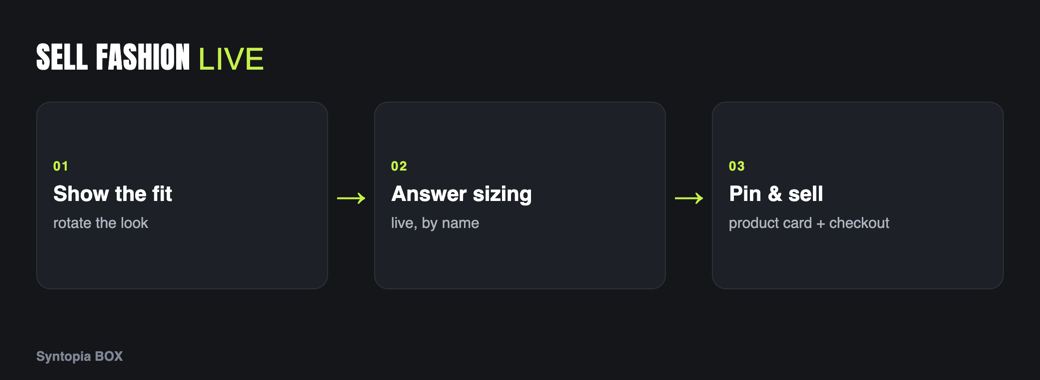
- Fashion converts on movement and fit — a live AI host can rotate through outfits and show how each one moves.
- Train an AI avatar that can wear your garments and show them to the lens, not just talk about them.
- Pin size, fabric and price to on-screen product cards and let smart chat field “does it run small?” questions instantly.
- Run outfit-rotation streams on TikTok, YouTube and Shopee, and keep several rooms live at once for different collections or markets.
Why live selling converts for fashion
Apparel is the category where the gap between a photo and the real thing is widest. A flat-lay shows colour, but not how a hem swings when the model turns, how a knit sits across the shoulders, or whether a “flowy” dress is actually sheer under light. Returns in fashion are driven almost entirely by that gap — the garment arrived, but it did not move, fit or look the way the picture promised.
Live selling closes the gap because the shopper watches the garment in motion and asks their own question before they buy. The problem has always been staffing: a human model can present for a couple of hours before they tire, and a brand with hundreds of SKUs cannot put a person in front of every one. An AI host removes that ceiling. Once trained, your AI avatar models look after look without a break, so every drop, every size run and every market can have its own live room.
What to demo on camera
The job of a fashion stream is to answer the three questions a photo cannot: how does it move, how does it fit, and what does it go with. Build your run of show around demonstrating, not describing.
- Movement. Have the avatar turn, walk a step and let the fabric settle. Dresses, skirts and outerwear live or die on how they move.
- Fit and layering. Show the same piece on, tucked, buttoned and open. Build a full outfit around a hero item so shoppers see what to pair it with.
- Fabric and detail. Bring stitching, buttons, a zip pull or a print right up to the lens. Close-ups are where perceived quality is won.
- True colour. State the real colour name and show it against skin, because screen colour is the single biggest return driver in apparel.
Because a trained Syntopia BOX avatar can wear your clothes and hold them up to the camera, these are real demonstrations rather than a talking head reading a spec sheet. See AI live selling for physical products for the mechanics of showing items on camera.
Avatar & scene tips for apparel
Fashion is a visual-trust category, so the host and the set have to look the part. A few choices make the difference:
- Style the avatar to the brand. Train a host whose look matches your customer — streetwear, workwear, occasion or modest fashion all read differently. You can train more than one avatar and give each its own voice, so a single brand can field a different face for each collection.
- Light for fabric, not for the face alone. Even, soft light shows texture and true colour; harsh light flattens knits and blows out whites. Shoot your training footage the same way.
- Set a scene that frames the clothes. A clean studio backdrop keeps attention on the garment; a styled room suits lifestyle and occasion wear. Keep the background uncluttered so the outfit stays the subject.
- Pin a product card for every look. The card carries size range, fabric and price so the shopper never has to ask for the basics — and you are never quoting a price the avatar might get wrong.
Script & offer structure
A fashion stream works as a rotation: a repeating loop of short, self-contained segments, one per look, so a viewer who arrives at any moment lands in the middle of a complete pitch.
| Beat | What the avatar does | On screen |
|---|---|---|
| Reveal | Introduces the look and who it is for. | Pin the product card. |
| Move | Turns, walks, lets the fabric settle. | Close-up of detail. |
| Fit & style | Shows sizing, layering and what to pair it with. | Size range on card. |
| Answer | Handles live sizing and fabric questions. | Smart chat replies. |
| Call to action | Names the offer and moves to the next look. | Checkout prompt. |
For offers, lean on fashion-native urgency — limited sizes left, bundle a top with a bottom, or a this-stream-only styling set — and let smart live chat answer “does it run small?” or “is it see-through?” the instant it is asked, in your host’s voice. Keep every price on the pinned card and the pricing page logic in the shop, not improvised on air.
Platforms that fit fashion
Three platforms carry most Western-facing fashion live commerce, and Syntopia BOX can drive a room on each:
- TikTok — the strongest discovery engine for apparel; fast-moving, trend-led drops and impulse buys.
- YouTube — longer lookbook-style streams and collection launches where viewers settle in.
- Shopee — marketplace shoppers who are already in a buying mindset, strong for value and volume ranges.
Match the room to the platform: punchy single-look segments for TikTok, a fuller styled lookbook for YouTube, clear value framing for Shopee.
Selling 24/7 across many rooms
Fashion demand is global and never sleeps, so the real advantage of an AI host is coverage. Because your host does not tire, you can run outfit rotations overnight and across time zones, and because Syntopia BOX scales with the PCs and accounts you add — with no fixed cap on the number of rooms — you can run a different collection, market or language in each room at the same time. One operator can oversee many rooms at once, stepping in only when a stream needs a human. Current plans are on the pricing page; the sibling guide AI live selling for jewellery & accessories covers close-up-led categories if you also sell accessories.
Frequently asked questions
How does AI live selling work for a fashion brand?
You train an AI avatar in Syntopia BOX from a short, well-lit clip of a presenter, then build a live room where the avatar models your garments on camera — turning, showing fit and bringing details to the lens — while pinned product cards carry size, fabric and price. The AI runs the stream and answers viewer questions live in your host’s voice.
Can the AI avatar actually wear and show the clothes?
Yes. A trained Syntopia BOX avatar moves like a real person and can hold a garment up close and wear your clothes to show them to the camera, which is why natural movement and good lighting in your training footage matter. It demonstrates the piece rather than only describing it.
Which platforms are best for fashion live selling?
For Western-facing brands, TikTok drives discovery and impulse buys, YouTube suits longer lookbook and launch streams, and Shopee reaches marketplace shoppers already in a buying mindset. Syntopia BOX can run a live room on each, and you can keep several rooms live at once.
Can I run more than one fashion collection live at the same time?
Yes. Syntopia BOX scales with the PCs and accounts you add, with no fixed cap on rooms, so you can run a separate live room per collection, market or language simultaneously. One operator can oversee many rooms and take over any stream when needed.
How do I handle sizing questions during a live stream?
Smart live chat reads the comments and answers common sizing, fabric and fit questions instantly in your host’s voice, while the pinned product card shows the size range so basics are visible without asking. A human operator can step in for anything the AI should not answer.
