


Electronics buyers do not buy on looks — they buy once their questions are answered. AI live selling gives gadget brands a host that can demo a feature, surface the spec that matters, and answer “does it work with my phone?” the moment it is asked. This guide shows how to set up an AI live-selling room in Syntopia BOX: what to demo, how to overlay specs, how to script a feature-led pitch, and how to run it around the clock.
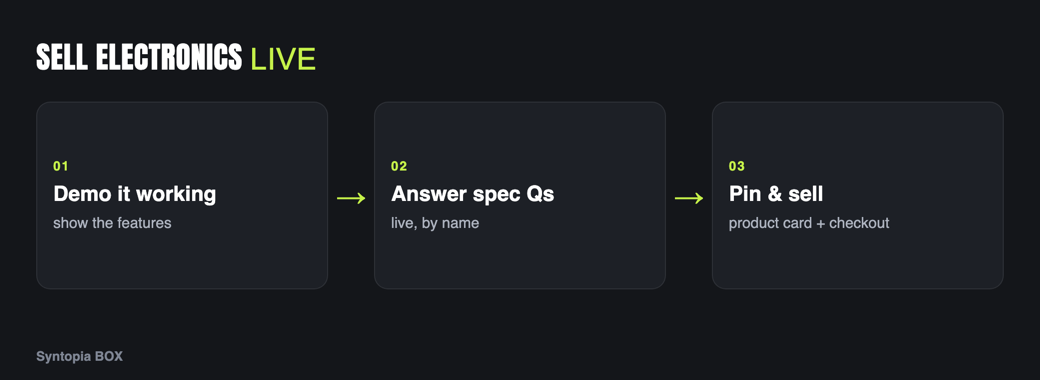
- Electronics sell on demonstrated features and answered questions, not aesthetics.
- Overlay spec callouts and product cards as the AI avatar demos each function.
- Connect your own AI model so smart chat can field detailed compatibility and spec questions live.
- Demo the gadget actually working on camera — powering on, pairing, performing.
- Run spec-led streams on TikTok, YouTube and Shopee, with many rooms live at once.
Why live selling converts for electronics
Electronics is a specification-and-reassurance category. Shoppers arrive with specific, blocking questions — battery life, port types, app compatibility, whether it fits their existing setup — and a static listing rarely answers all of them. The unanswered question is where the cart is abandoned.
Live selling converts because the demo and the answer arrive together: the viewer watches the earbuds pair, the camera stabilise, the vacuum climb the rug, and asks their edge-case question in the comments. The old limit was that a knowledgeable human demonstrator is expensive and can only be live for a few hours. A trained AI avatar — especially one backed by your own connected AI model — can demo and answer accurately for hours, so complex catalogues get the explanation they need.
There is a compounding effect, too: electronics buyers often watch several minutes before committing, and much of that time is spent waiting for someone else to ask the question they were wondering about. A live room full of answered questions does the persuading for you — each reply the host gives to one viewer reassures the dozens reading silently. Keep the room running long enough and the comment history itself becomes a living FAQ that closes sales without the host repeating a word.
What to demo on camera
- The product working. Power it on, pair it, run it. “It works” is more persuasive than any spec sheet.
- The headline feature. Pick the one capability that wins the sale — noise cancelling, battery, picture quality — and prove it on camera.
- Scale and ports. Show real size in hand and the actual ports and buttons, so there are no surprises on arrival.
- Spec overlays. Pop the numbers on screen as the avatar reaches each feature, so the claim and the proof land together.
A trained Syntopia BOX avatar can hold the device up close and operate it on camera; the physical-demo mechanics are in AI live selling for physical products.
Avatar & scene tips for gadgets
- Pick a credible host. Electronics buyers trust a host who reads as knowledgeable. Train an avatar — and a clear, confident voice — that fits a tech-explainer tone.
- Set a demo-friendly scene. A clean desk or lifestyle set where the device can actually be used (a desk for peripherals, a kitchen for appliances) beats an empty studio.
- Use spec-chip overlays. Feature callouts that appear beside the avatar as it demos keep the key numbers on screen without cluttering the pitch.
- Pin the product card. Model, key specs and price on the card mean the avatar never misquotes a number and buyers see the essentials at a glance.
Common mistakes to avoid
The biggest electronics-stream mistake is leading with specs instead of the problem they solve — viewers tune out a spec recital but lean in when they watch the gadget fix a frustration they recognise. The second is a demo that never actually runs the product; a device shown powered-off and merely described is far weaker than one shown working in front of the viewer. The third is improvised spec answers: a confidently wrong figure about battery life or compatibility becomes a return and a one-star review, so the host should answer from your real spec data and defer anything uncertain to a human. Treat accuracy as part of the pitch, not an afterthought, and the demos sell themselves.
Script & offer structure
Electronics suit a feature-led loop — each product gets a demo-then-prove segment:
| Beat | What the avatar does | On screen |
|---|---|---|
| Problem | Names the pain the gadget solves. | Pin the product card. |
| Demo | Powers it on and shows it working. | Spec callout overlay. |
| Prove | Demonstrates the headline feature. | Key number on screen. |
| Answer | Fields compatibility and spec questions. | Smart chat replies. |
| Offer | Names the deal and moves to the next item. | Checkout prompt. |
Offers that fit gadgets: a bundle (device plus accessory or warranty), a limited launch price, or a this-stream-only accessory throw-in. The real conversion engine here is the Q&A: connect your own AI model so smart live chat can answer detailed “will it work with X?” and “what’s the battery life?” questions accurately from your spec data, in your host’s voice. Keep prices on the pinned card and in the shop per the pricing page.
For electronics, a wrong spec answer is a return waiting to happen. Feed the host accurate spec and compatibility data, pin the real numbers to the card, and keep a human operator ready to take over for warranty or support questions.
Platforms that fit electronics
- TikTok — fast, benefit-led demos of accessible gadgets and impulse accessories.
- YouTube — the natural home for deeper, feature-rich demos and higher-ticket devices where buyers research.
- Shopee — value-comparing marketplace shoppers for mainstream electronics and accessories.
Syntopia BOX can drive a room on each; keep TikTok punchy, YouTube thorough, and Shopee value-clear.
Selling 24/7 across many rooms
Tech shoppers research at all hours, so always-on coverage captures demand a day-only team would miss. Your AI host does not tire, so feature demos can run overnight and across markets, and because Syntopia BOX scales with the PCs and accounts you add — with no fixed cap on rooms — you can run different product lines, markets or languages in parallel rooms. One operator oversees many rooms and takes over for warranty or support edge cases. See plans on the pricing page, and the sibling guide AI live selling for home & kitchen products for appliance-style demos.
Frequently asked questions
How does AI live selling work for electronics and gadgets?
You train an AI avatar in Syntopia BOX, then build a live room where it powers on and operates each device, proves the headline feature, and surfaces specs as on-screen overlays while pinned cards carry the model, key specs and price. The AI runs the stream and answers compatibility questions live in your host’s voice.
Can the AI answer detailed spec and compatibility questions?
Yes. You can connect your own AI model so smart live chat answers detailed ‘will it work with X?’ and battery, port and spec questions accurately from your product data, in your host’s voice. For warranty or support questions a human operator can take over at any time.
Can the avatar actually demonstrate the gadget working?
Yes. A trained Syntopia BOX avatar can hold a device up close and operate it on camera — pairing, powering on, running the feature — so viewers see it work rather than reading a spec sheet. Good lighting and a demo-friendly scene make the demonstration clear.
Which platforms are best for electronics live selling?
TikTok suits fast benefit-led demos and impulse accessories, YouTube is the home for deeper feature demos and higher-ticket devices, and Shopee reaches value-comparing marketplace shoppers. Syntopia BOX can run a live room on each simultaneously.
How do I avoid returns from wrong spec answers?
Feed the host accurate spec and compatibility data, pin the real numbers to the product card, and let smart chat answer from that data rather than improvising. Keep a human operator ready to take over for anything the AI should not answer, such as warranty terms.
