

Home and kitchen products sell when a shopper sees them in use — the pan searing, the organiser actually organising, the gadget saving a real minute. AI live selling lets these brands run that demonstration on camera, on repeat. This guide shows how to build an AI live-selling room in Syntopia BOX: what to demo in a real scene, how to set and light the space, how to script a use-case pitch, and how to keep rooms live around the clock.
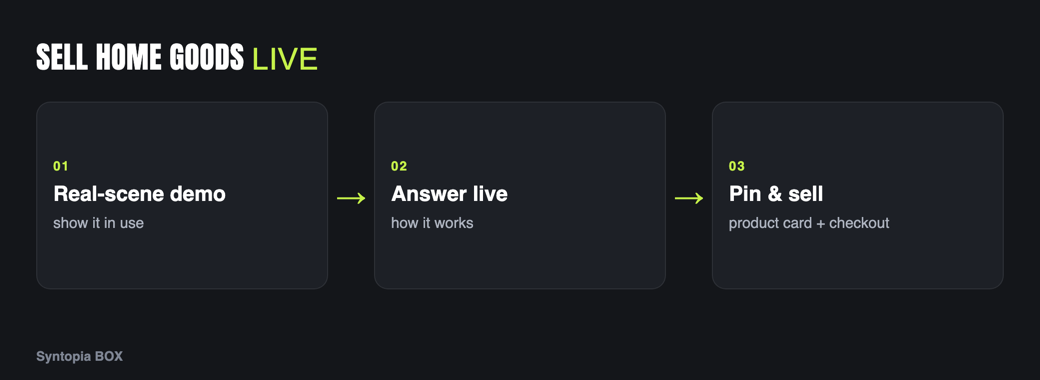
- Home & kitchen converts on the in-use demo — showing the product solve a real task.
- A trained AI avatar can handle and operate products in a real scene, not just describe them.
- A styled room set (kitchen, living space) sells better than an empty studio for this category.
- Pin size, capacity and price to product cards; let smart chat answer “will it fit my counter?” live.
- Run use-case streams on TikTok, YouTube and Shopee, with many rooms live at once.
Why live selling converts for home & kitchen
Home and kitchen is the most “show, don’t tell” category of all. A listing can claim a knife is sharp, a container is airtight or an air fryer is fast, but the shopper has heard those claims a hundred times. What moves them is watching the thing happen — the tomato sliced paper-thin, the lid sealed, the fries crisp in minutes.
Live selling is built for exactly this: a continuous, real-scene demonstration of the product doing its job. The constraint was always the demonstrator — a human can only cook, clean and organise on camera for so long. A trained AI avatar can run use-case demos for hours in a realistic set, so every product in a broad homeware catalogue can be shown actually working.
Homeware catalogues also tend to be wide and shallow — dozens of low-to-mid-price items, each needing its own quick demonstration to sell. That is a poor fit for a human team, who can realistically feature only a handful of products per session, but an ideal fit for an AI host that can rotate through the whole range tirelessly. The product that would otherwise never get its moment on camera finally gets one, and small-ticket items that live or die on being seen in action start converting.
What to demo on camera
- The product doing its job. Cook with it, clean with it, store something in it. The in-use moment is the whole sale.
- Before and after. Show the mess, then the tidy; the raw, then the cooked. Contrast makes the benefit undeniable.
- Real size and capacity. Show the item on a counter, next to a hand or a common object, so buyers judge whether it fits their space.
- Ease and speed. Demonstrate how little effort or time it takes — convenience is the core promise of the category.
A trained Syntopia BOX avatar can handle and operate products in a real scene, so these are genuine demonstrations, as covered in AI live selling for physical products.
Scene & avatar tips for home products
- Set a real scene. This category benefits more than any other from a styled set — a kitchen backdrop for cookware, a living space for storage and decor. The context is part of the demo. Shoot your training footage with the same natural movement you’ll want on air.
- Light the workspace. Light the counter or table where the action happens, not just the host’s face, so viewers can clearly see the demo.
- Pick an approachable host. A warm, practical host suits homeware. Train the avatar and voice to feel like a helpful neighbour, not a hard-sell pitch.
- Pin size, capacity and price. Dimensions and capacity on the product card answer the “will it fit?” question before it is asked.
Common mistakes to avoid
Home and kitchen streams fail when the demo is faked or rushed. Shoppers can tell when a pan is not really hot or a cut is staged, and the trust evaporates, so let the demo run at a believable pace — the real searing, the real seal, the real result. The second mistake is lighting the host but not the workspace, which leaves the actual demonstration in shadow where it cannot do its job. The third is skipping the size reference; without a hand or a common object in frame, buyers cannot judge whether the item fits their counter, and that uncertainty quietly kills the sale. Show the product honestly doing its job, lit and framed so the result is unmistakable, and the pitch largely writes itself.
Script & offer structure
Home and kitchen suit a use-case loop — each product gets a problem-then-demo segment:
| Beat | What the avatar does | On screen |
|---|---|---|
| Problem | Names the everyday frustration. | Pin the product card. |
| Demo | Uses the product to solve it, live. | Close-up of the action. |
| Reveal | Shows the before/after result. | Capacity/size on card. |
| Answer | Handles fit, care and capacity questions. | Smart chat replies. |
| Offer | Names the deal and moves to the next item. | Checkout prompt. |
Offers that fit homeware: a kitchen or room bundle, a set discount, or a this-stream-only add-on. Let smart live chat answer “is it dishwasher safe?”, “will it fit a small kitchen?” and “how do I clean it?” instantly in your host’s voice. Keep all prices on the pinned card and in the shop per the pricing page.
Platforms that fit home & kitchen
- TikTok — satisfying, fast before/after demos of problem-solving gadgets; strong impulse category.
- YouTube — fuller cooking and set-up demos and higher-ticket appliances where buyers watch longer.
- Shopee — value and bundle-driven marketplace shoppers kitting out a home.
Syntopia BOX can run a room on each; keep TikTok snappy, YouTube demonstrative, and Shopee value-led.
Selling 24/7 across many rooms
Homeware shopping happens in the evenings and at weekends across every time zone, so continuous coverage pays. Your AI host does not tire, so use-case demos can run overnight and across markets, and because Syntopia BOX scales with the PCs and accounts you add — with no fixed cap on rooms — you can run cookware in one room and storage or decor in another at once, each in its own language. One operator oversees many rooms and steps in when needed. Plans are on the pricing page; see the sibling guide AI live selling for electronics & gadgets for appliance-style spec demos.
Frequently asked questions
How does AI live selling work for home and kitchen products?
You train an AI avatar in Syntopia BOX, then build a live room where it uses each product in a realistic scene — cooking, cleaning, organising — and shows the before/after result while pinned cards carry size, capacity and price. The AI runs the stream and answers fit and care questions live in your host’s voice.
Can the AI avatar demonstrate products in a real scene?
Yes. A trained Syntopia BOX avatar can handle and operate products on camera in a styled set, such as a kitchen backdrop, so viewers watch the item actually work. A real scene and good lighting on the workspace make the in-use demo convincing.
How do I answer ‘will it fit my space?’ questions live?
Pin dimensions and capacity to the product card so the basics are always on screen, and let smart live chat answer specific size, fit and care questions instantly in your host’s voice. A human operator can take over for anything that needs a judgement call.
Which platforms work best for home and kitchen live selling?
TikTok suits satisfying fast before/after demos, YouTube is better for fuller cooking and appliance set-ups, and Shopee reaches value and bundle-driven marketplace shoppers. Syntopia BOX can run a live room on each at the same time.
Can I run several homeware rooms at once?
Yes. Syntopia BOX scales with the PCs and accounts you add, with no fixed cap on rooms, so you can run cookware, storage and decor in separate rooms, in different languages, simultaneously, with one operator overseeing them all.
