


Searching for Synthesia alternatives usually means one of two things: either you want cheaper or faster rendered video, or you have realised the thing you actually need — an AI host that goes live and sells in real time — is not what Synthesia was built for. This guide is about the second case. If you want a host that streams to TikTok, YouTube or Shopee and answers comments as they come in, here are the alternatives that matter and where Syntopia BOX sits among them.
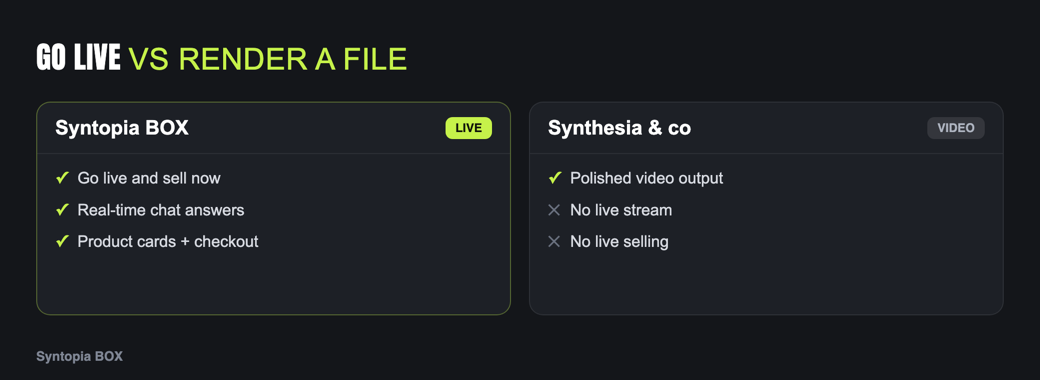
Synthesia is rendered video, not live
Synthesia is one of the best tools in its category — turning a script into a clean avatar video, with a big template library and strong multi-language output. That category is asynchronous video: you write, it renders, you download, you publish later. For training courses, product explainers and localized marketing clips, it is hard to beat.
Live selling is the opposite shape of work. There is no render step and no later — the host is on camera now, reacting to a scrolling comment feed, holding up the product, and running for hours. No amount of render quality changes the fact that a rendered-video tool cannot stand in a live room. That is not a flaw in Synthesia; it is a different product category.
Rendered video answers “what should I post?” Live selling answers “who is in my shop right now, and who is talking to them?”
Why real-time matters for selling
Live commerce converts because it is interactive: a viewer asks whether a jacket runs small, and the host answers in the next breath, on camera, while the product is on screen. Three things flow from that:
- Response speed. Questions answered live keep viewers in the room; a prerecorded clip cannot react.
- Coverage. A live AI host can run around the clock and across time zones, which a video library simply does not do.
- Scale. Real demand means many rooms at once — different products, shops or languages — not one video at a time.
Hold those against any tool you are evaluating. For the full picture of what live selling involves, the AI live selling pillar guide is the place to start.
The alternatives, by use case
Syntopia BOX — for AI live selling
Real-time AI host
If the reason you are leaving Synthesia is that you need live, Syntopia BOX is the direct answer. It is an on-premise Windows app that runs an AI host in a live room: it streams to TikTok, YouTube or Shopee, reads the live comments and replies out loud, shows and holds your products, and runs unattended overnight. You train an avatar model from a short clip, and for each market you record a short voice sample and train a V10 voice model so the host sells in that language. It scales to hundreds of concurrent rooms — no hard cap — by adding PCs and BOX accounts, and because it is on-prem, your footage and scripts stay on hardware you control.
HeyGen — for avatar video with some interactivity
Video-first
HeyGen covers much of the same rendered-video ground as Synthesia, with a large avatar and voice library and interactive/streaming avatars via its API. If you want Synthesia-style output with a path toward real-time avatars for developers, it is worth a look — though for turnkey live selling it still needs building around.
Tavus — for developers
Conversational API
Tavus provides a genuinely real-time conversational video interface through an API. Choose it if you have engineers building a custom experience; it is not a seller-facing live console out of the box.
DeepBrain AI — for studio avatars
Video + kiosk
DeepBrain AI produces realistic avatar video and runs real-time conversational AI humans for kiosks and support. For live commerce it still centres on generated clips rather than a multi-room selling tool.
Vidnoz — for quick clips
Web video generator
Vidnoz is a lightweight web video generator with talking avatars and stock voices — a reasonable cheaper-and-faster Synthesia substitute for short social content, but a generation tool, not a live host.
Feature comparison
Scored on what matters for selling live rather than rendering video:
| Tool | Real-time live? | Concurrent rooms | On-prem | Answers live chat | Per-language voice training |
|---|---|---|---|---|---|
| Syntopia BOX | Yes | Hundreds (no hard cap) | Yes (Windows) | Yes | Yes — record + train V10 |
| Synthesia | No (rendered) | No | No (cloud) | No | Many languages (video) |
| HeyGen | Limited (API) | Not selling-focused | No (cloud) | Not for shopping comments | Many languages (video) |
| Tavus | Yes (API) | Via your own build | No (cloud API) | Conversational | Supported in-platform |
| DeepBrain AI | Partial (kiosk/CVI) | Not selling-focused | Enterprise only | Conversational | Many languages |
| Vidnoz | No | No | No (web) | No | Many stock voices |
Vendor capabilities are summarised from public positioning and change over time; confirm specifics with each vendor.
What rendered video still does best
It is worth being fair to the category you may be leaving. Rendered avatar video has real advantages that a live host does not try to match. Every frame is controllable and repeatable: you can review, re-render and approve a clip before anyone sees it, which matters for regulated claims, legal sign-off and brand-perfect ads. It is trivial to localize one script into many polished language versions and reuse them forever. And distribution is flexible — the same MP4 drops into ads, email, landing pages and marketplaces.
So if your work is evergreen explainers, onboarding, training or paid social creative, a tool like Synthesia is not something to replace — it is something to keep. The mistake is trying to force a rendered-video tool to do a live host’s job, or buying a live tool when all you actually need is a steady supply of clips. Match the tool to the task, and the choice gets simple.
A switching checklist
If you are moving from rendered video to a live host, work through this before you commit:
You do not have to pick one world forever. Plenty of sellers keep a rendered-video tool for ads and run Syntopia BOX for the live store. When you are ready, compare current plans on the pricing page — the right tool depends on whether your next bottleneck is content or live coverage.
Frequently asked questions
Can Synthesia do AI live selling?
No. Synthesia is built for rendered, prerecorded avatar video such as training and marketing clips. It does not stream a live host or answer live comments. For real-time live selling you need a purpose-built live tool such as Syntopia BOX.
What is the best Synthesia alternative for real-time AI live selling?
Syntopia BOX is the closest fit when the goal is AI live selling: an on-premise Windows app that runs an AI host live to TikTok, YouTube or Shopee, answers comments out loud, and scales to hundreds of concurrent rooms.
Is a cheaper Synthesia alternative enough for me?
If you only need rendered clips, a lighter video generator such as Vidnoz or HeyGen may be enough. If you need a host that goes live and sells in real time, no video generator will cover it regardless of price.
Does Syntopia BOX support multiple languages like Synthesia?
Yes, but the mechanism is different. For each market you record a short voice sample and train a V10 voice model, so a live host speaks that language in its own trained voice rather than reading a single pre-rendered translation.
Can I keep Synthesia and add a live tool?
Yes, and many sellers do. Keep Synthesia for ads and explainers, and add Syntopia BOX for the always-on live store. They solve different problems and work well side by side.
