
TikTok Shop Seller Guide
If you want to know how to host a TikTok live that actually sells, start with the person on camera. Room setup, scripts and team structure matter, but viewers decide to stay or scroll in the first seconds, and what they judge is the presenter: the voice, the energy, the way the product is explained and how the chat is handled. This guide is the on-camera skill, as we teach it: a four-move method, a pitch formula, selling lines, how to run the chat and how to protect your stamina over long shows.
- Many viewers stay only briefly, so every product pitch must work for someone who just arrived. Repetition is the method, not a flaw.
- Use four moves on every product: over-explain, show how to buy, say why now, repeat.
- Sell with a story: name the customer’s pain, show the difference, then give a reason to buy in this LIVE.
- Speak slowly and clearly, look into the lens, and let a moderator handle rude comments so you never have to react on air.
- A Syntopia AI host can run the same method around the clock, with a human able to take over at any moment.
What this video covers
- Why two hours goes wrong without a plan (0:00): most viewers stay 30 to 60 seconds, so a live is a loop. Every few minutes, anyone arriving gets a product, a reason to buy and a way to buy.
- The plan (0:50): traffic comes in a shape (a launch spike, a dip, a hold, then waves), so match products to it: a traffic puller, your best seller, a margin builder.
- The first 15 minutes (2:05): who you are, the line-up, every deal up front, a giveaway straight away, then a flash drop, then your best seller.
- The product block (3:43): interaction, product review, transaction. Four habits: over-explain, show how to shop, say why here and now (truthfully), repeat.
- Two hours, one loop (6:33): fill the live with a loop of blocks, and flex when sales per minute drop by firing a giveaway or a drop.
- On camera (8:12): speak clearly and a little slower, look into the lens, run the chat like a shop floor, and split roles with a co-host.
- The close (9:59): round-up, top three, a basket reminder, a last call, and when you are on next.
- Run it with an AI host (10:54): Syntopia’s AI hosts present your run order and answer the chat out loud, on TikTok Shop, Shopee, YouTube and more. It runs on Syntopia BOX or Syntopia Cloud.
Read the full transcript
These are real shopping livestreams. Behind every one that sells is a plan. Every product, every deal, every giveaway, timed to the minute. Here’s how to write one for your own shop, and how to present it on camera. This video is based on the strategies of LiveBuzz Studio, an official TikTok Shop Partner that works with world-class brands. It’s high-level strategy most brands don’t know. Without a plan, two hours goes wrong in three ways. Viewers come and go every minute,
so most of them never hear your deal. The numbers dip after the first push. And long before the end, you run out of things to say. So here’s the route. Why a live is a loop, not a story. The first fifteen minutes. The product block, the part that actually sells. Then how to fill two hours, how to present it on camera, and how to close. Start with one fact.
Most viewers stay for thirty to sixty seconds. Over two hours, the room turns over again and again, and every new person arrives in the middle of something. So a live isn’t a story with a beginning and an end. It’s a loop. Every few minutes, anyone arriving gets a product, a reason to buy, and a way to buy. Then know the shape of the traffic. When you go live, there’s a spike, while TikTok works out who to show you to.
Then a dip, as the numbers settle. If people stay and buy, it holds. After that, it moves in waves, and the waves depend on what you do in the room. Each stage needs a different product. The launch spike needs a traffic puller: your easiest yes, like a flash deal or a giveaway. The dip needs your sales driver, the best seller that keeps people buying. Once it holds, pair it with a margin builder, like a bag with a dress.
Then round again. How long should a live be? On your first lives, thirty to forty five minutes is fine. Then build to at least an hour, because longer lives give the loop time to work. This video plans a two hour show, like the showcase we use as our example, but the same plan scales down. The first five minutes have one job: give people a reason to stay. Say who you are and how long you’re on. Then the line-up: how many products,
your top three, and a question for the chat. Then every deal, up front. The live-only price, free shipping, any giveaway, and exactly how to enter. Then start a giveaway straight away. You set it up in TikTok’s live giveaway tool: a product from your shop as the prize, a countdown between five minutes and a quarter of an hour, and an entry task, like commenting, watching for a set time, or following. One giveaway runs at a time, and the system picks the winners. Right after that, a traffic deal:
a small quantity at a deep, real discount. Sellers call it a flash drop, or a one dollar drop. One showcase guide sizes the stock at about five percent of the viewers online, so a thousand viewers gets fifty units. It creates a burst of orders early on. Then, while the room peaks, switch to your best seller. Then use targets to grow the room. Set a number of likes to unlock the next giveaway or drop. Ask viewers to share the live,
because shares bring new people in. And use the giveaway’s watch task, so entering means staying for one, three, or five minutes. Compare two openings. One host spends ten minutes saying hello, waiting for the room to fill. The other opens with tonight’s deals, starts a giveaway, and drops a deal by minute five. Only the second gives the first wave of viewers something to react to. And if only three people are watching on your first lives, run the opening anyway,
and greet each one by name. Now the core of the show: the product block. Every product gets three parts. Interaction, to win attention, like promising a deal in three minutes. The product review: the problem it solves, shown and proved on camera. And the transaction: why buy now, and exactly how. If sales are weak, go back to part one. In the review, answer the doubts before they’re typed. Will it fit me?
How long does it last? Does it work for my skin, my kitchen, my car? Show it on camera, then say it. And combine the selling points, so the product sticks in people’s heads. Inside every block, use four habits. One, over-explain: describe it as if nobody has seen it, because most viewers have you on in the background. Two, show how to shop. Three, say why to buy here, and now. And four, repeat all of it.
Compare. This dress is gorgeous. Or: this dress is heavy cotton, so it doesn’t cling. I’m five foot six, wearing a size ten, and it sits just below the knee. The pockets fit a phone. The second one sells. Here’s a quick test. Could someone understand the product with the sound off, just watching? And with their eyes closed, just listening? Two, show how to shop.
Many viewers don’t know they can buy without leaving the app. Hold your phone up to the camera and do it for real: tap the bag, pick the product and a size, and show the checkout. Say each tap out loud. And keep it all inside TikTok. Never send people to another website. Three: why here, why now? Everything you sell is available somewhere else. So give real reasons. A price only for this live.
Free or cheap shipping, with easy returns. And a giveaway. In one showcase, live-only free shipping on the whole basket, with no minimum, more than doubled the checkout rate. Only say it if it’s true. Then show the maths. Original price, the discount, and tonight’s price, with the old one crossed out, plus free shipping. One showcase found a clear discount with a crossed out price worked better than vouchers.
And note that a live flash deal can only be used once every twenty four hours. Four: repeat. Cover every product at least two or three times, and say how to buy every few minutes. The same message, in fresh words. And let your set repeat it too. A billboard on screen, an info board behind you, even the deal printed on what you wear. Here’s one pass through a product, timed, as an example. Thirty seconds on the question. Two minutes of demo.
One minute on the deal. And one minute walking through checkout. About four and a half minutes, and every product comes round two or three times, so over a live, each one gets nine to thirteen minutes. If this is useful, subscribe: it’s part of our series on live selling. Now the part most hosts get wrong: filling two full hours. Here’s how one showcase team planned theirs, minute by minute. A new product, hero products, a big giveaway at noon,
another new product, a one dollar item, then hero products again. The deals are spread across the show, not all spent in the first ten minutes. So chain your blocks into a loop. A traffic puller to pull people in. Your best seller, to make the money. A matching add-on with a better margin. And sometimes a new product you’re testing. Then round again. Say a loop takes about half an hour: a two hour live runs it three or four times. That’s not repetitive for your viewers. Each loop is a new audience.
Then flex as you go. One showcase team checked sales per minute in ten minute windows. When it fell, say from six hundred a minute to three hundred, they fired a giveaway or a flash drop. On a smaller live, watch the viewer count instead. If it drops during the add-on, jump back to a deal. And here’s how a showcase team ran each drop. Say the real price, then the drop price. Ask people to comment if they want it.
Set a target, like more stock if more people join. Then count down, three, two, one, and drop. Tell them another one is coming later, so they stay. Write each block as prompts, not sentences. One card per product: the opening question, three selling points, the demo, the deal, and the price. Glance at it, then talk naturally. Showcase teams go further,
with a deck of slides on a screen in front of the host, and a teammate who updates it live to match the pace. Now presenting. Keep the energy up, but speak clearly, and a little slower than feels natural. Excitement makes hosts rush, and then nobody catches the price. Look into the lens, not at the screen. And treat every viewer as if it’s the first time they’ve heard about the product, because for them, it is. Give each product a story. Start with a specific pain,
never, it’s for everyone. Then the solution, shown on camera. Then the reason to buy tonight. And pick a format that suits your product: a launch, a sale, a how-to, packing orders live, a Q and A, or showing how it’s made. Run the chat like a shop floor. When someone asks to see a product, show it. A quick recap if you’ve covered it, or tell them when it’s coming. Answering requests keeps people watching. Don’t argue with trolls.
Let a moderator mute them, and talk to the people who came to shop. You don’t have to do it alone. Even a small live works better with two people: a host, and an operator who pins products, runs the giveaways, and watches the chat. With a co-host, agree who does what before you start, and never talk over each other. Big showcase teams split it further: moderators, a deck controller, a comment manager, and camera. And protect the host: no morning shift after a night one.
And cheap props lift the energy. A countdown clock for each deal. A bell for every sale. Hand clappers, and a clap when the price drops on the deal. Here’s a drill for this week. Pick one product, and record yourself presenting it for five minutes, with the four habits. Watch it back with the sound off, then listen with your eyes closed. Fix one thing, and go again. A few rounds of this will show you exactly what to fix.
The last five minutes. Run through every product quickly, and name tonight’s three best sellers. Give a five minute warning, and remind people that items in their basket aren’t theirs until they check out. Show checkout once more. Ask what they’d like to see next time. Then a one minute last call. Thank everyone, say when you’re on next, and ask them to follow. Here’s the whole show on one page. Zero to five minutes: intro, line-up and deals.
Five to fifteen: a giveaway, a traffic deal, then your best seller. Then your loop, three or four times, with a giveaway or a drop whenever sales slow. And the last five minutes: round-up, last call, and follow. Afterwards, open Seller Center, then analytics, then live, and lay the numbers next to your run sheet. Where did viewers arrive, and where did they leave? Which part of the plan sold the most? Move the strong parts earlier,
and rewrite the weak ones. Running this loop for two hours, every day, wears out any host. Syntopia gives you hyper-realistic AI hosts. You write the run order and the cue cards once, and the AI host presents it, repeats it all night, and answers the chat out loud, on TikTok Shop, Shopee, YouTube, and more. It runs on Syntopia BOX or Syntopia Cloud. See it at syntopia.ai. Next: what to sell on your live, and how to set up the room.
Watch one of these next.
What a LIVE host actually does
A TikTok Shop LIVE is the closest thing online to a shop assistant. In a store, someone walks up, answers your question and shows you how the product works. On LIVE that same exchange happens one to many, in real time, and viewers can buy without leaving the app. That is why hosts sell: they supply the trust, the detail and the urgency that a product listing cannot.
It also explains why the job is different from presenting a video. A video is watched once from the start. A LIVE is joined at every minute by people who have never heard you speak, and most leave quickly. The host is not performing for a fixed audience. The host is welcoming a constant flow of newcomers and persuading them, one by one, to look up and buy.
This guide stays on that skill. If you need the other layers, we cover them separately: the livestream script, the live room team structure and the live room setup. Here we cover what the host does with them.
The four-move presenter method
This post is the on-camera performance skill. Our livestream script guide is the writing and structure layer that sits behind it. The hosts we coach repeat the same four moves, in the same order, on every product. Learn them until they are automatic and the rest of the show gets easier.
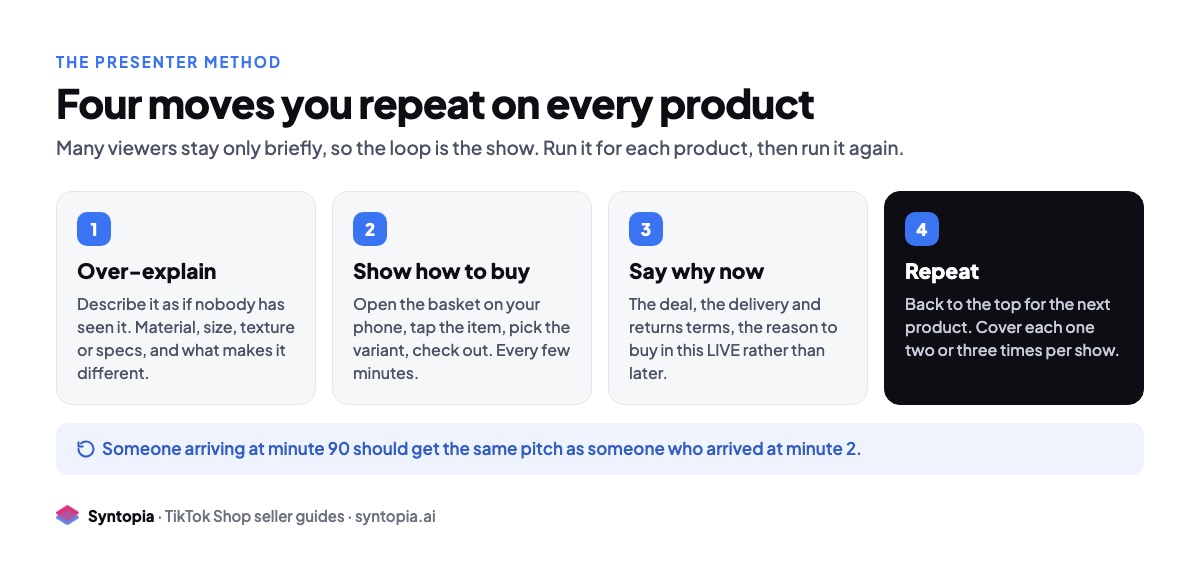
1. Over-explain
Describe each item as if nobody has ever seen it. Go into more detail than feels necessary, because a big share of your audience is half-watching and your words have to make them look up. For fashion and beauty that means quality, material, fit, sizing and texture. For tech it means specs and what they change for the buyer: prepare a detailed version and a simple version so both kinds of viewer are served.
A useful test: could someone understand the product if they only listened, and could they understand it if they only watched with the sound off? A good pitch passes both.
2. Show how to buy
Shopping inside TikTok is easy, but it is new to many people, and plenty of viewers do not know they can buy inside the app. Keep showing them. Hold your phone to the close-up camera, open the basket, tap the product, choose the colour or size and walk through checkout. Remind viewers that they buy in the app, and say what that gets them, such as the LIVE price and any delivery and returns terms you offer. Then invite anyone who is stuck to say so in the comments.
3. Say why now
Everything on TikTok Shop is available somewhere else. A host has to keep answering why a viewer should buy here and now. The usual reasons are a better or exclusive price that lasts for this LIVE, simple delivery and returns so there is little risk in trying, and a giveaway that gives people a reason to stay and share. Only promise offers you have actually set up in Seller Center, and use the official giveaway tool where your market offers it rather than improvising on the spot. Check your Seller Center.
4. Repeat
If it feels like you have said it too often, you are probably close to right. Many people drop in only briefly, so a pitch that only works once works for almost nobody. Many people drop in only briefly, so a pitch that only works once works for almost nobody. Cover each product at least two or three times in a show, and repeat how to buy and what to buy. It will feel repetitive to you. To a newcomer it is brand new.
Run of show and host structure
Within a long LIVE, the host’s day has a simple shape: a short opening, a long product loop, and a short close. For a two-hour show, think roughly five minutes open, the bulk of the time in the loop, and about five minutes to close.
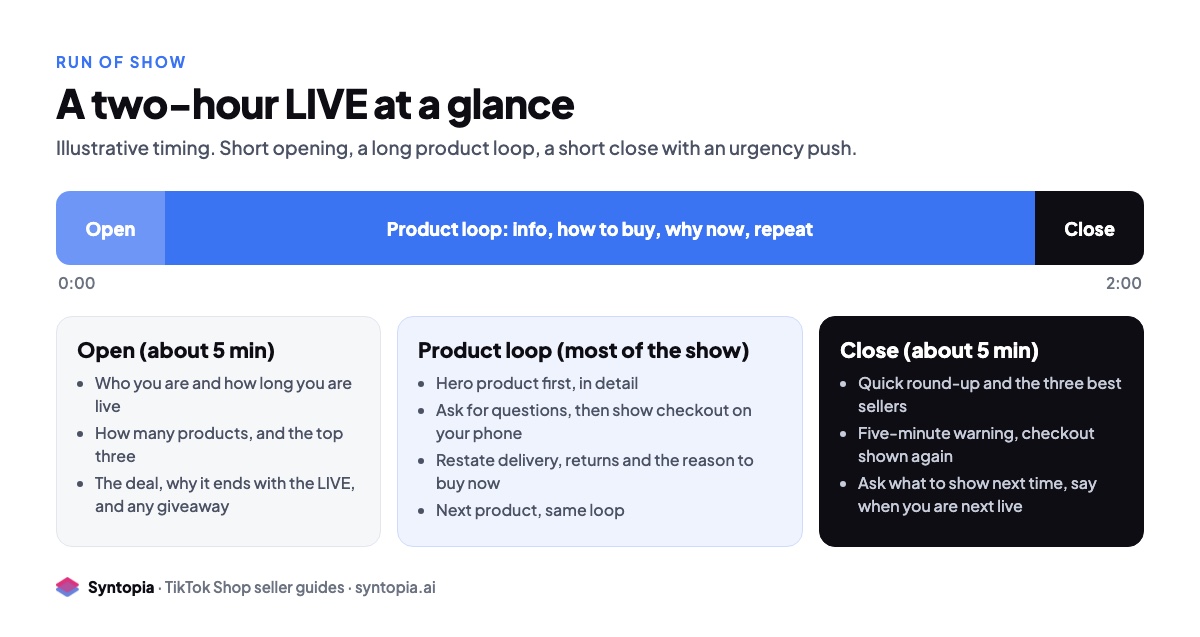
Open with who you are, how long you are live, your top three products and the time-limited deal. Spend most of the show in the product loop, hero product first. Close with a quick round-up of the best sellers, a clear last call and when you are next live. The full timing, wording and template for each part sit in our livestream script guide.
The interaction, review, transaction loop
Inside the product loop, hosts for product marketing, launch and sale LIVEs can use a simple three-phase structure. It tells you what to do when sales are slow, which is the moment most hosts panic and cut the price.
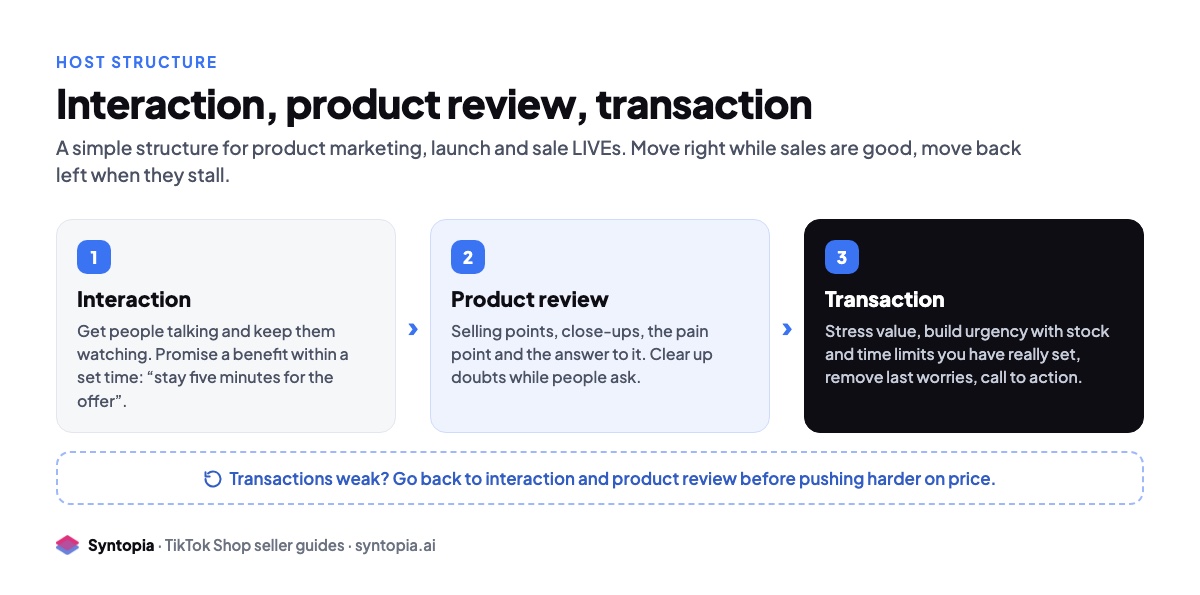
- Interaction: keep people watching by promising a benefit within a set time, such as the offer in five minutes.
- Product review: explain the selling points, tie them together so the product sticks in memory, and name the pain points the product solves.
- Transaction: stress good value, build urgency with stock and time limits you have really set, remove the last worries and finish on a clear call to action.
Voice and energy
New hosts assume energy means speed and volume. It does not. When you get excited it is easy to go high and fast, and then viewers cannot follow what you are selling. The target is high energy with clear words.
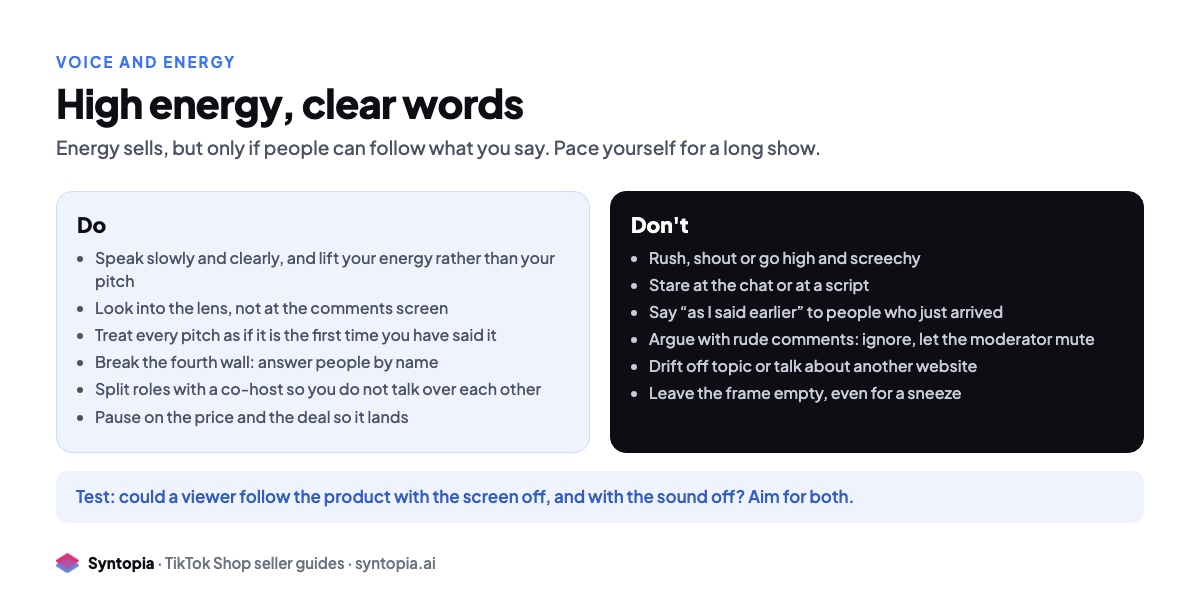
Speak slowly and clearly
Slow down, enunciate and let the price and the deal land with a pause. Lift your energy through your face, your hands and what you do with the product rather than through pitch and pace. A show can run two hours or longer, so pace yourself: a host who starts at full volume has nothing left at hour two.
Look at the lens
You will be surrounded by screens, people and comments, and it is easy to read the chat instead of looking at the camera. To the viewer that feels like talking to someone who is wearing sunglasses. Keep a second phone or screen to one side for the chat, glance at it, and come back to the lens to speak. Talk to people directly and use their names. This is not television, so break the fourth wall.
Make every pitch the first pitch
You may have described a product five times, but the person who just joined has heard none of it. Do not say you already covered it. Make each viewer feel special by delivering the pitch with the same energy as the first one.
Share the talk with a co-host
Two hosts can bounce off each other and keep the energy up over a long show. Agree the roles in advance, for example one covers the product description and the other covers how to buy, so you never talk over each other. If you can, choose hosts who look different from each other, because viewers buy when they see someone like themselves using the product.
The pitch formula
A list of features does not sell. A short story does. The formula has three parts, and it works for any product.
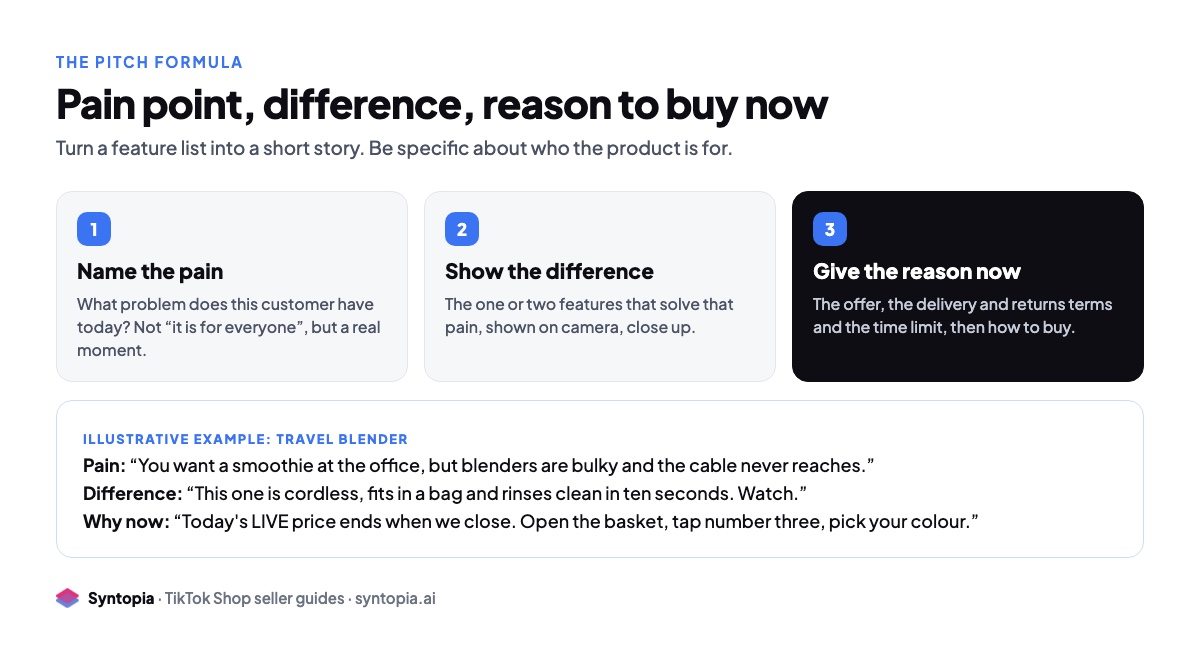
- Name the pain. Be specific about who the product is for and what problem they have in a real moment of their day. “It is for everyone” sells nothing.
- Show the difference. Pick the one or two features that solve that pain and show them on camera, up close.
- Give the reason now. The offer, the delivery and returns terms and the time limit, then how to buy.
By the end of the story the viewer should be thinking that they need this product and they need it now. Write the pitch as three or four bullet prompts for each product, not as a script to read out. Bullets keep you personal and responsive; a read script sounds flat and pulls your eyes to the page. If you want a full structure for the whole show, our livestream script guide covers modules and templates.
Selling lines to keep in rotation
Hosts who sound natural have a small set of lines they can reach for at any moment. Five kinds cover almost every situation.
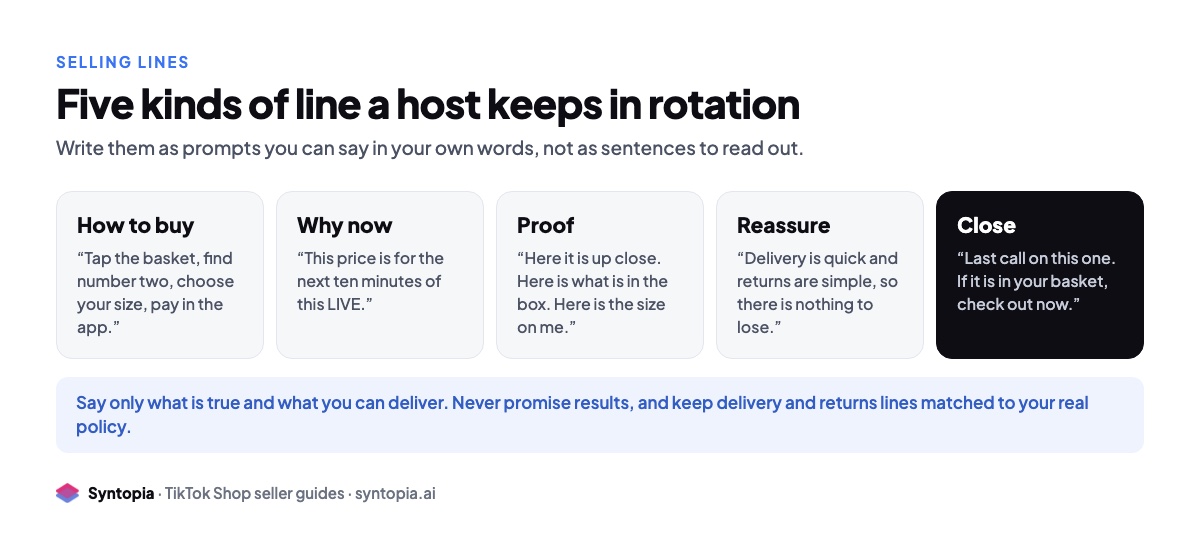
- How to buy: “Tap the basket, find number two, choose your size and pay in the app.”
- Why now: “This price is for this LIVE only.” Use it only if it is true and the promotion is set in Seller Center.
- Proof: show the product up close, the contents of the box, the size on a real person.
- Reassure: mention delivery and returns terms as they really are, so trying something new feels low risk.
- Close: a last-call line and a clear next action.
Keep each line short, say it in your own words and rotate them, so a viewer who stays for ten minutes does not hear the same sentence ten times. For more templates and timing, see our script framework.
Handling the chat
The chat is not a distraction from the show. It is the show. Responding to people keeps them engaged and raises watch time, and the host who ignores comments loses them. Think in triage, with a standard response for each kind of comment.
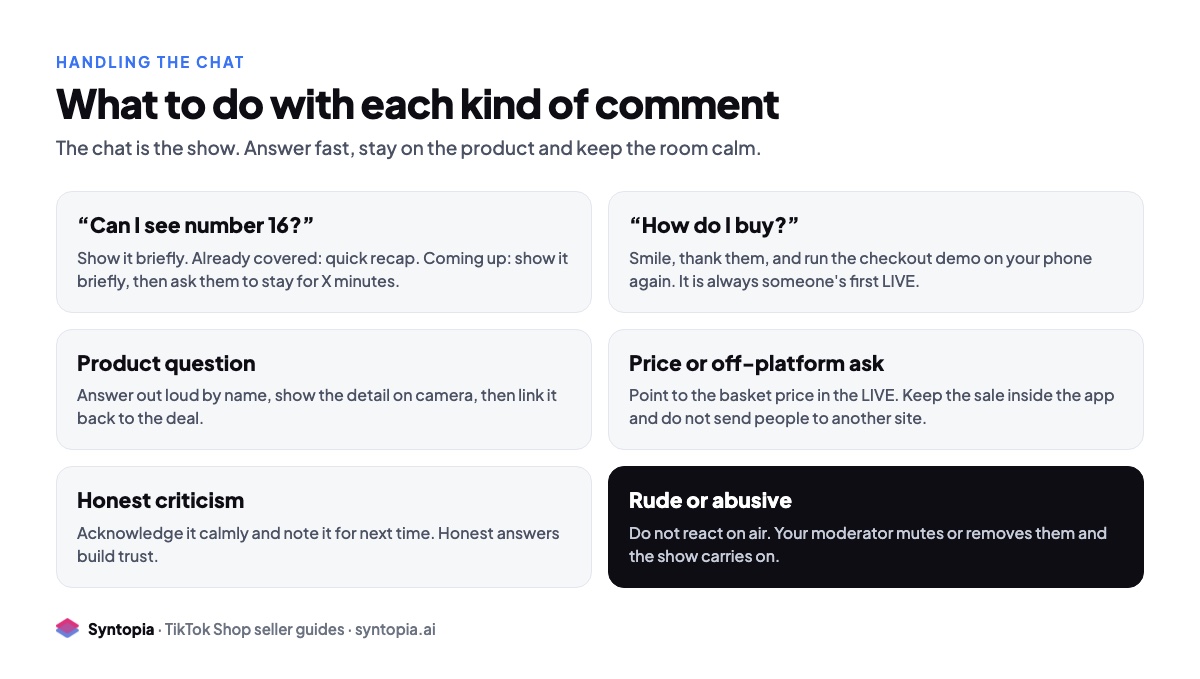
Requests to see an item. When someone asks to see a product by number, respond. If you have already covered it, give a quick recap. If it is coming up, show it briefly and ask them to stay a few more minutes until you reach it properly.
How-to-buy questions. Always answer kindly and show the checkout again. It is someone’s first LIVE.
Rude or hostile comments. A LIVE is public, and not every comment is kind. Do not react on air: replying rarely helps. A moderator mutes or removes the commenter and you carry on. Our team structure guide explains who does what in the room.
Off-platform asks. If someone asks for your website, keep the sale in the app and point to the basket. Platforms can penalise redirects, so check current LIVE rules in your Seller Center.
Honest criticism. Acknowledge it, answer calmly and note it for next time. Authenticity builds trust. If a green powder does not taste great on its own, say so, then show what makes it taste good.
When you are on a phone, a second device for the chat helps, and with a team a moderator handles it for you. If you want to read more on why the chat matters, see smart live chat for AI hosts.
Presenting by product category
The method is the same for everything, but what you demonstrate changes with what buyers need to see.
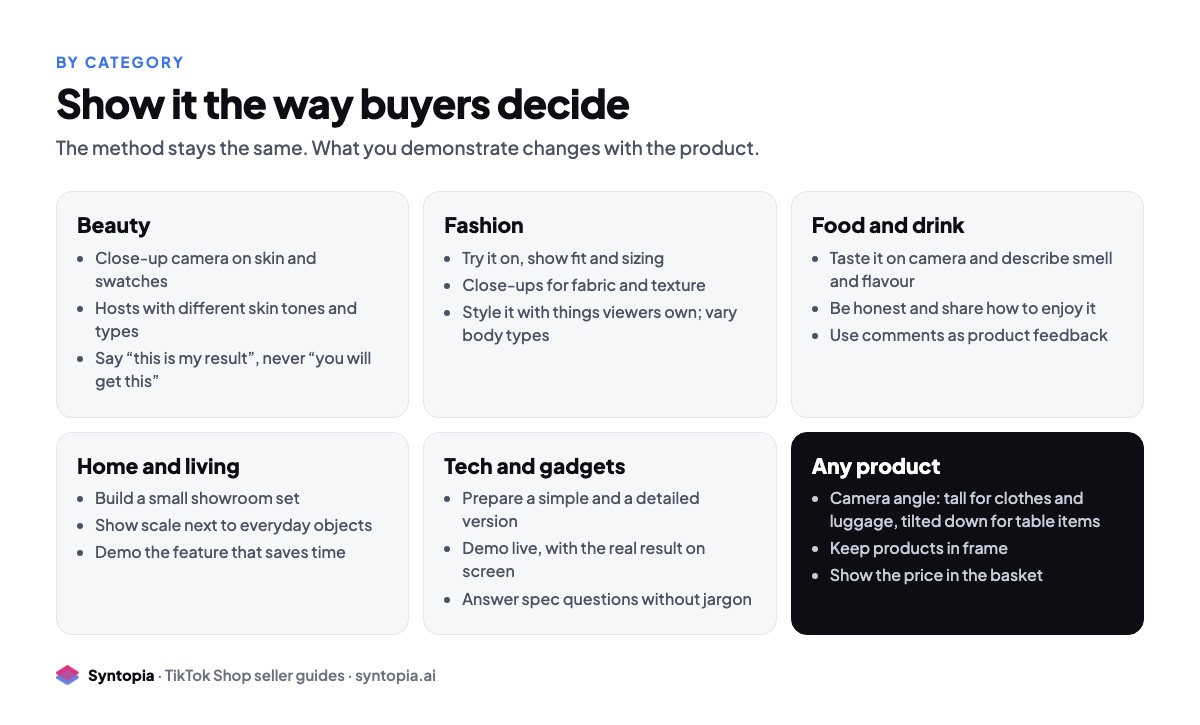
- Beauty: use a close-up camera, because stage lighting hides the effect of makeup. Show different skin tones and types, and use a half-face demo if you only have one host. Describe your own result rather than promising one.
- Fashion: try items on, talk about fit and sizing and show fabric and texture close up. Show how a piece fits into a wardrobe viewers already own, and use hosts of different sizes.
- Food and drink: taste on camera and describe smell, taste and texture honestly. Use comments as product feedback.
- Home and living: build a small showroom so viewers see the product in context.
- Tech and gadgets: demonstrate live, and keep a simple and a detailed explanation ready.
Camera angle matters too. A standing frame suits clothing, home textiles and luggage. A camera angled down at a table suits food, beauty, toys and accessories. Whatever your category, choose the angle that shows the product best, and read our product selection guide for which products to feature and in what order.
Storytelling formats
If every LIVE looks the same, regulars drift away. Rotate formats so the same method gets fresh packaging.
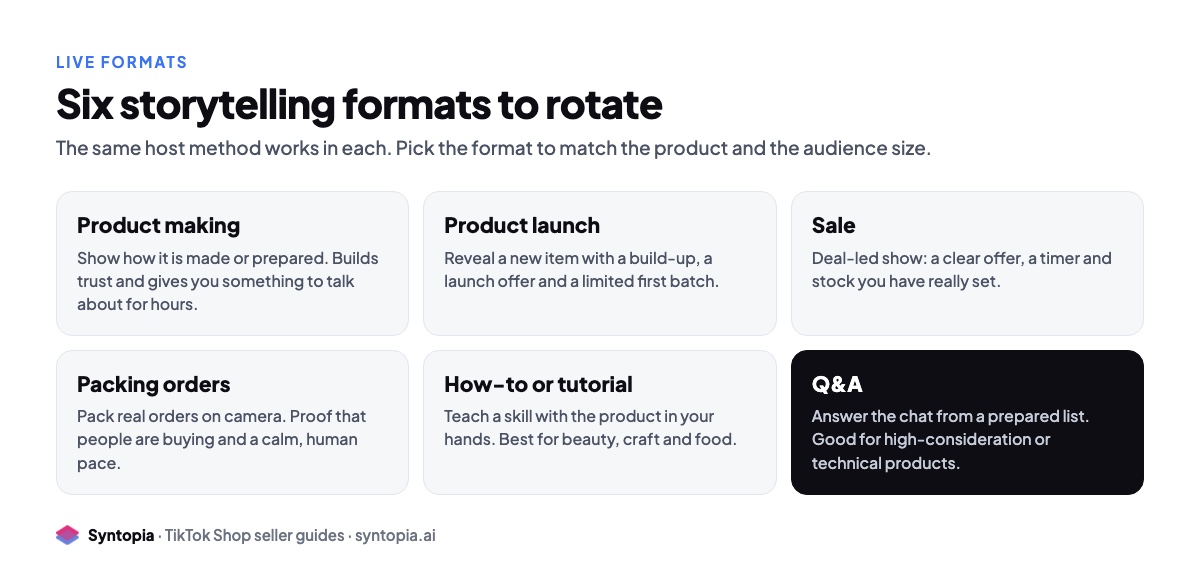
Product making, product launch, sale, packing orders, how-to or tutorial, and Q&A all work. The host structure changes with the format: a launch builds anticipation, a sale leans on the transaction phase, a tutorial lives in product review, and a Q&A runs on the chat. Some formats suit certain products and audience sizes better than others, so test them and keep the ones that hold viewers. Our live stream review framework shows how to read the results.
Stamina, rotas and a host bench
Long shows are tiring, and a tired host sells less. Plan the schedule around the person, not just the traffic.
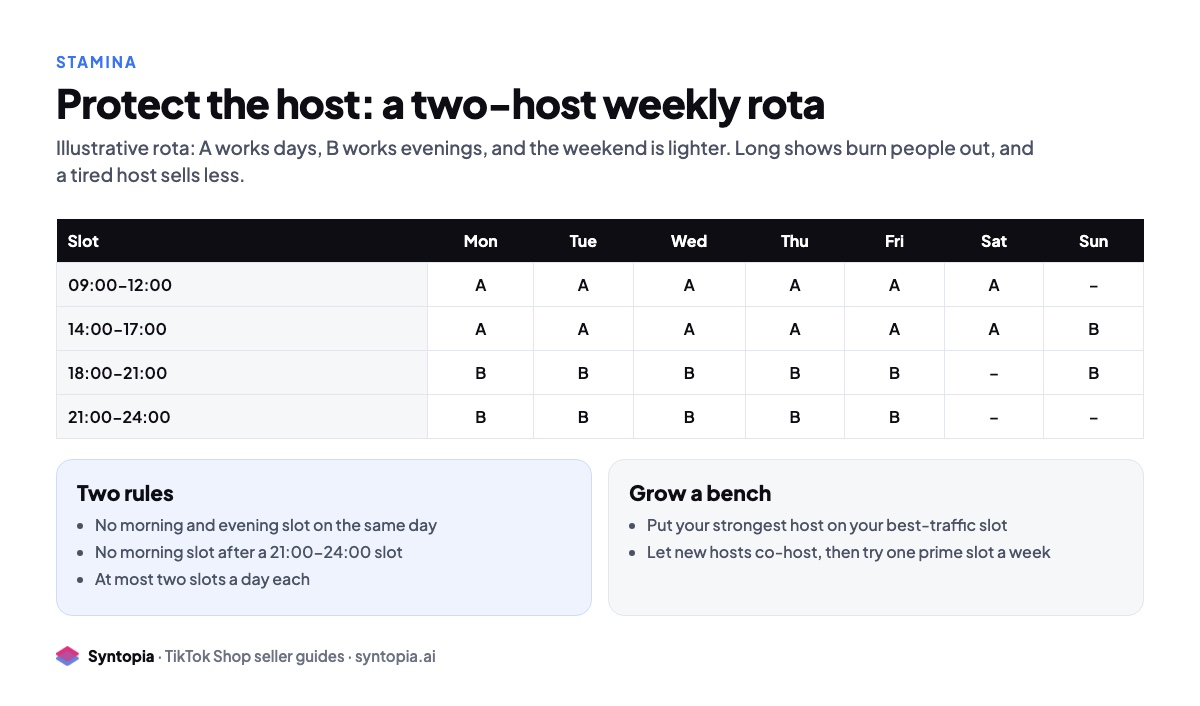
- Do not schedule a morning run and an evening run back to back for the same person.
- Do not give someone a morning shift the day after a night shift.
- Keep batteries, chargers and a stable connection ready so a technical failure does not break your momentum. If the stream drops, you lose the traffic you built.
- Always keep a person on screen. If you must cough, sneeze or swap hosts, have someone present, because an empty frame may be read as a still image. Check current LIVE rules.
As you do more shows you will need more than one host. Put your strongest host in your best-traffic slot, let newer hosts start in quieter slots, and let them co-host with the lead host before you try them in a prime slot. A small owner-run shop often has one great host, the owner, and the results drop when anyone else steps in. Building a bench of two or three hosts fixes that. For a sense of how long to stay live, see how long a live stream should be.
Say it safely: on-camera rules
Hosts get carried away, and a few habits cause most of the problems. Rules change by market and over time, so treat this as a checklist and confirm the details in your Seller Center.
- Do not promise results. If you cannot promise the same result to everyone, say what happened for you and that results vary.
- Match the listing. What you say should match the product description, and the product you talk about should be in your LIVE basket.
- Set promotions properly. Create flash sales and giveaways in Seller Center beforehand. An improvised “whoever comments wins” may be treated as gambling, so use official tools.
- Keep the sale in the app. Do not steer people to other sites or marketplaces.
- Stay on topic. Keep the conversation tied to the products you are selling, and check current LIVE rules on off-topic content.
- Do not panic about a violation. They happen to experienced sellers. Learn from the notice and adjust.
Our guide to common TikTok Shop LIVE mistakes goes deeper, and why a live stream is not converting helps when the show is working but the sales are not.
A 6-step plan for your next LIVE
You get better by repeating the method on camera, not by reading about it. Work through these six steps before your next show.
- Choose three products: Pick a hero product and two supporting items, and decide the order you will present them.
- Write the pitch: For each product write the customer's pain, the feature that solves it and the reason to buy now as short bullets.
- Rehearse checkout: Practise showing the basket, product, variant and payment steps on your phone until it takes under a minute.
- Plan the show: Plan about five minutes to open, the bulk of the time in the product loop and about five minutes to close.
- Go live and repeat: Run the four moves on each product, answer the chat by name and cover each product two or three times.
- Review the replay: Watch the replay, note where energy dipped or lines repeated, and fix one thing before the next show.
Where an AI host fits
Everything above describes a human host, and every point also describes the job of an AI host. A well-built AI host explains each product in depth, shows the buying steps, states the reason to buy now and repeats the cycle, without a dip in energy at hour two or at 3 a.m. That consistency is exactly what the method asks for, including disclosing that your host is AI-generated.
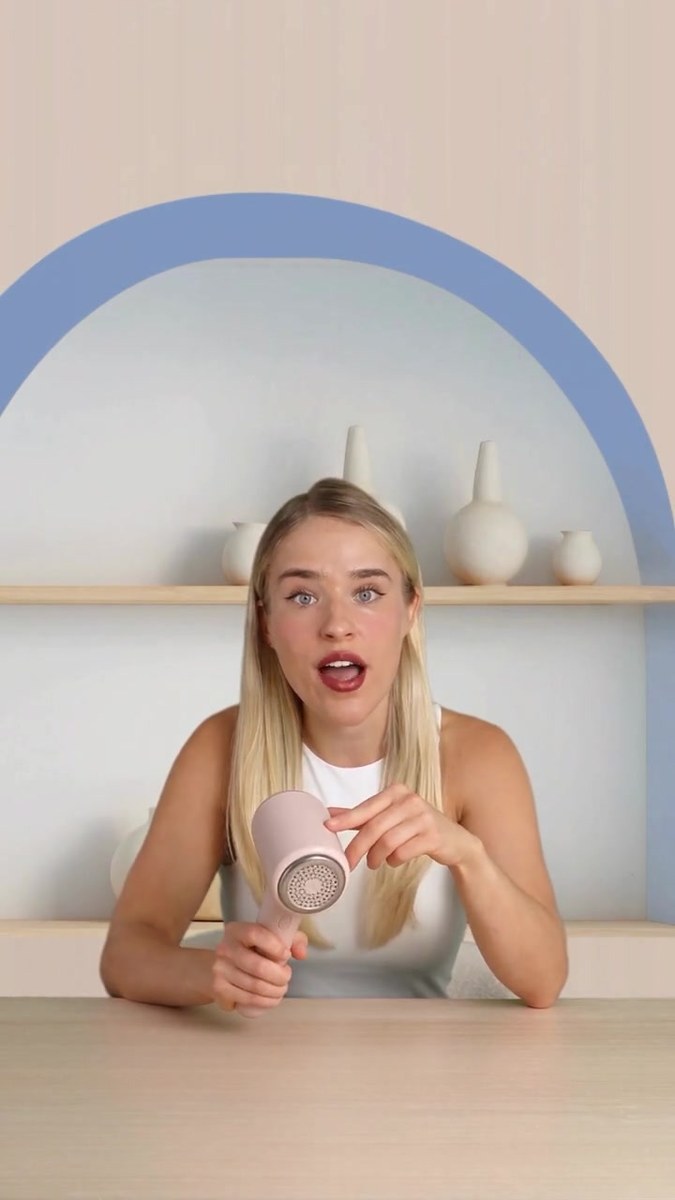
Syntopia is the purpose-built AI live-selling platform: a state-of-the-art AI host that presents your products, answers comments out loud and keeps your TikTok Shop LIVE running 24/7, on Syntopia BOX on your own PC or on Syntopia Cloud. Your own team can host the peak hours, and the AI host can cover the rest. A real person can take over the room whenever you choose: read how human takeover works. Rules for AI hosts differ by market and can change, so read whether AI live selling is allowed on TikTok Shop and check your Seller Center before you go live.
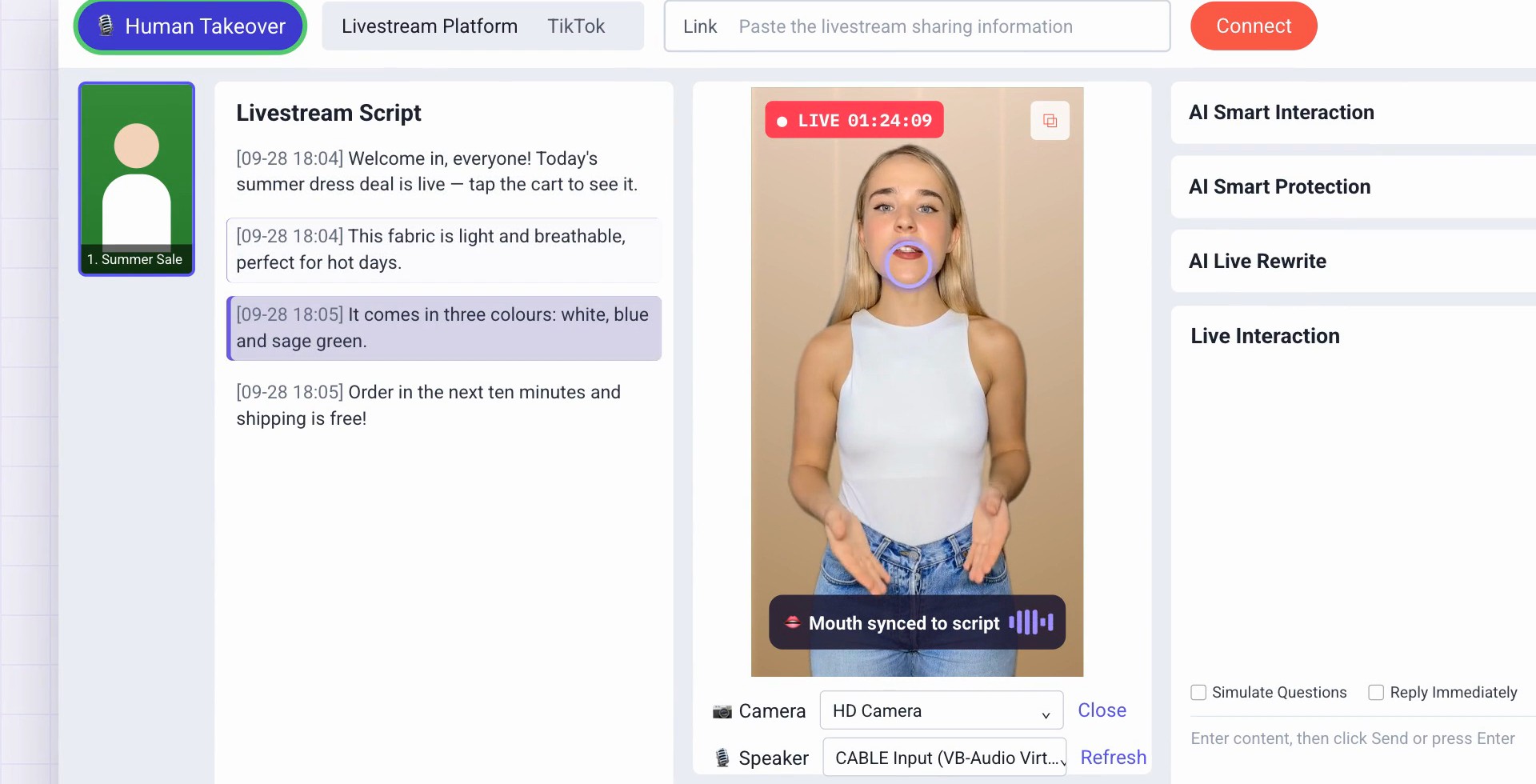
Plans start at $29 a month, and the Business plan gives unlimited live access for $1,380 a month. See plans and pricing, follow the complete Syntopia tutorial to have your first room live today, or read AI live selling for the model end to end.
Frequently asked questions
How do I host a TikTok live for the first time?
Pick two or three products, write a short pain, difference and reason-now pitch for each, and rehearse the checkout demo on your phone. Start with a 30-minute LIVE, cover each product twice, show how to buy often and build up to 60 minutes or more as you get comfortable.
What should I say at the start of a TikTok live?
Introduce yourself, say how long you are live and what is on offer, name your top three products, and ask viewers in the comments what they want to see. Announce your time-limited deal and any giveaway and how to enter, then start with your hero product.
How do I keep viewers watching my TikTok live?
Treat every pitch as the first one, because many viewers stay only briefly. Speak slowly and clearly, look at the lens, answer comments by name, repeat how to buy, and give a reason to stay such as a deal coming up or a giveaway.
How do I handle negative comments on a TikTok live?
Do not react on air. Replying usually brings more abuse. Have a moderator mute or remove the commenter, answer honest criticism calmly and carry on selling. Everyone else in the room is there to buy.
Can an AI host present a TikTok Shop LIVE?
An AI host can follow the same method: explain, show how to buy, say why now and repeat. Syntopia runs AI hosts on BOX (your own PC) or Cloud, with human takeover available. Whether and how AI hosts are allowed depends on your market and the current TikTok Shop rules, including disclosure of AI-generated content, so read the TikTok Shop AI-generated content policy (see the TikTok Shop Academy article) and check your Seller Center before you go live.