


Syntopia BOX Guide
The whole point of an AI host is that it does not clock off. This tutorial shows you how to schedule unattended AI live streams in Syntopia BOX — building a recurring live calendar, rotating products and scripts per slot, and putting safeguards in place so your rooms keep selling overnight without someone watching the screen.
- Scheduling turns an occasional stream into continuous coverage across time zones, weekends and overnight.
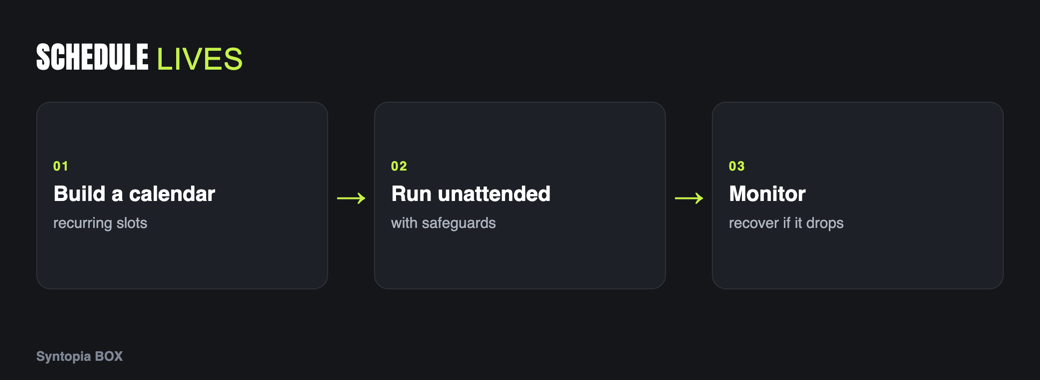
- Map the hours you want covered, then build recurring slots, each tied to a room, avatar, script and product set.
- Set guardrails before any unattended run — on-script limits, claim filters and a human-takeover path.
- Rotate products and scripts per slot so returning viewers stay engaged and your whole catalog gets airtime.
- There is no hard cap on concurrent rooms, so you can schedule many rooms in parallel across your PCs.
A human host sells for the hours they are paid to sit on camera. An AI host can sell for all of them — but only if you schedule it. Scheduling is what turns “I went live today” into continuous coverage across time zones, weekends and the small hours when a surprising amount of buying still happens.
Why scheduling matters
Coverage is the lever. If your competitors are live four hours a day and you are live sixteen, you have four times the shopfront time for the same catalog. Scheduling also makes your output predictable: regular slots train returning viewers to show up, and they let you plan which products get airtime when.
There is a quieter benefit too. A scheduled calendar forces you to plan the week as a whole rather than deciding each morning whether to go live. That planning is where the strategy lives — which products you push on which days, when you run a promotion, how you balance peak and off-peak. The schedule becomes the plan, and the AI host simply executes it hour after hour without needing to be talked into another shift.
Setting up a recurring live calendar
Start by deciding your coverage, then build repeating slots to fill it:
- Map your coverage. Decide which hours each room should be live — peak selling windows first, then off-peak and overnight.
- Create a recurring slot for each block, assigned to a specific room and avatar.
- Attach a script and product set to each slot so the room knows what to sell when it starts.
Unattended runs and safeguards
An unattended run is a stream that starts, sells and ends without anyone at the keyboard. Before you leave a room to run itself, put guardrails in place: on-script limits and claim filters so the host stays safe (covered in live moderation and compliance), and a clear human takeover path so a real person can step in if something needs a human. Unattended does not mean unsupervised — it means you supervise by exception, not by sitting there.
Rotating products and scripts per slot
Running the identical script around the clock bores returning viewers and wastes your catalog. Assign different products and scripts to different slots: hero products in peak windows, clearance or bundles overnight, new arrivals in a dedicated slot. Rotation keeps the stream fresh and spreads airtime across your range instead of hammering one item.
A simple rotation plan might run three scripts: a “best sellers” set for your busiest hours, a “deals and bundles” set for the quiet afternoon dip, and a “new and seasonal” set overnight. Each uses its own product cards and its own hook, so a viewer who checks in at different times sees a genuinely different stream. Over a week that variety is what keeps regulars coming back rather than scrolling past a loop they have already seen.
Overnight and multi-room scheduling
Two force multipliers stack on top of scheduling. First, overnight slots capture buyers in other time zones and night-owl shoppers at home. Second, multiple rooms run in parallel — Syntopia BOX has no hard cap on concurrent rooms, so you can schedule many rooms across your PCs at once. Running several rooms simultaneously is covered in how to run multiple lives at once, and managing the accounts behind them in manage multiple shop accounts.
Monitoring scheduled streams
Check in on scheduled streams the way an air-traffic controller watches a board: a quick glance that each room is up, selling and answering comments. The analytics view is where you confirm a scheduled room is actually performing rather than merely broadcasting to an empty room. Set a routine — a morning and evening check — so problems surface within hours, not days.
Recovery if a stream drops
Streams drop — a network blip, a platform hiccup. Plan for it: know how to restart a room quickly, keep the PC and connection stable (see PC and hardware requirements), and decide in advance whether a dropped overnight slot should auto-restart or wait for your morning check. A written recovery step beats improvising at 3 a.m. For the end-to-end room build, see the complete Syntopia BOX guide.
Step-by-step recap
Frequently asked questions
Can Syntopia BOX run live streams unattended?
Yes. You can schedule recurring slots that start, sell and end on their own. Before leaving a room unattended, set guardrails: on-script limits and claim filters so the host stays safe, and a human-takeover path so a real person can step in by exception. Unattended means you supervise by exception rather than sitting at the screen.
How do I schedule streams across different time zones?
Map the hours you want covered, including overnight, and create a recurring slot for each block. Because there is no hard cap on concurrent rooms, you can schedule overnight slots to capture buyers in other time zones while your peak-hour rooms run at the same time across your PCs.
Should each scheduled slot use the same script?
No. Rotate products and scripts per slot: hero products in peak windows, clearance or bundles overnight, and new arrivals in their own slot. Rotation keeps returning viewers engaged and spreads airtime across your whole catalog instead of repeating one pitch.
What happens if a scheduled stream drops overnight?
Plan recovery in advance. Keep the PC and connection stable, know how to restart a room quickly, and decide whether a dropped overnight slot should restart automatically or wait for your next check. Monitoring the analytics view on a set routine means a drop surfaces within hours rather than days.
