Attachment 1_(One-Click Training) V2V3 Digital Human Host Appearance Recording Standards
(One-Click Training) V2/V3 Digital Human Host Appearance Recording Standards
Powered by large-model capabilities, Syntopia Digital Human can quickly replicate a real person based on 5-10 minutes of video footage, generating a digital host. The before-and-after results are as follows:
[FeiFei Driver Video.mp4] Recorded source footage | [1.mp4] Resulting live digital human effect |
1. Preparation Before Recording
- The host's lip movement while speaking must be standard, avoiding issues such as the mouth not opening or a crooked mouth while speaking
- Appearance should be presentable and approachable; light makeup is acceptable
- It is recommended to prepare a roughly 10-minute script tailored to your own livestream scenario.
- Or get familiar with a few livestream script excerpts from the file below.
Host Rehearsal / Getting a Feel for It
Perform the livestream following the script above. The overall movements should be fluid, naturally alternating between common livestream actions such as simulating a product pitch, scrolling on the phone to interact with comments, looking at the big-screen data, and checking cue cards. Each script segment should be filmed in a single continuous take — if you make a mistake, just keep going. Overall requirements:
- Face. Maintain a natural, relaxed smile. You may perform typical livestream actions such as looking at the camera while pitching products, scrolling the phone to interact with comments, looking up to answer questions, or turning your head to view big-screen data. Note: keep the degree of looking down or turning your head small — the limit is that you can still see the camera when looking back up;
- Head. While looking at the camera and speaking, the head may move slowly and slightly. Avoid frequent nodding up and down or shaking side to side in sync with speech;
- Eyes. Keep them natural and lively — blink and glance elsewhere occasionally; avoid staring fixedly at the camera the entire time;
- Hands. Do not raise hands above the shoulders or cover the face. Avoid gestures with clear meaning, such as counting on fingers or pointing in a direction. Neutral gestures like clasping hands together are fine;
- Mouth. Open it wide and show your teeth, as if speaking loudly. Speak slightly slower than in a normal livestream, and avoid small mannerisms such as pressing the lips together, licking the lips, or smirking. Keep the mouth closed when not speaking — don't leave it open. Example:
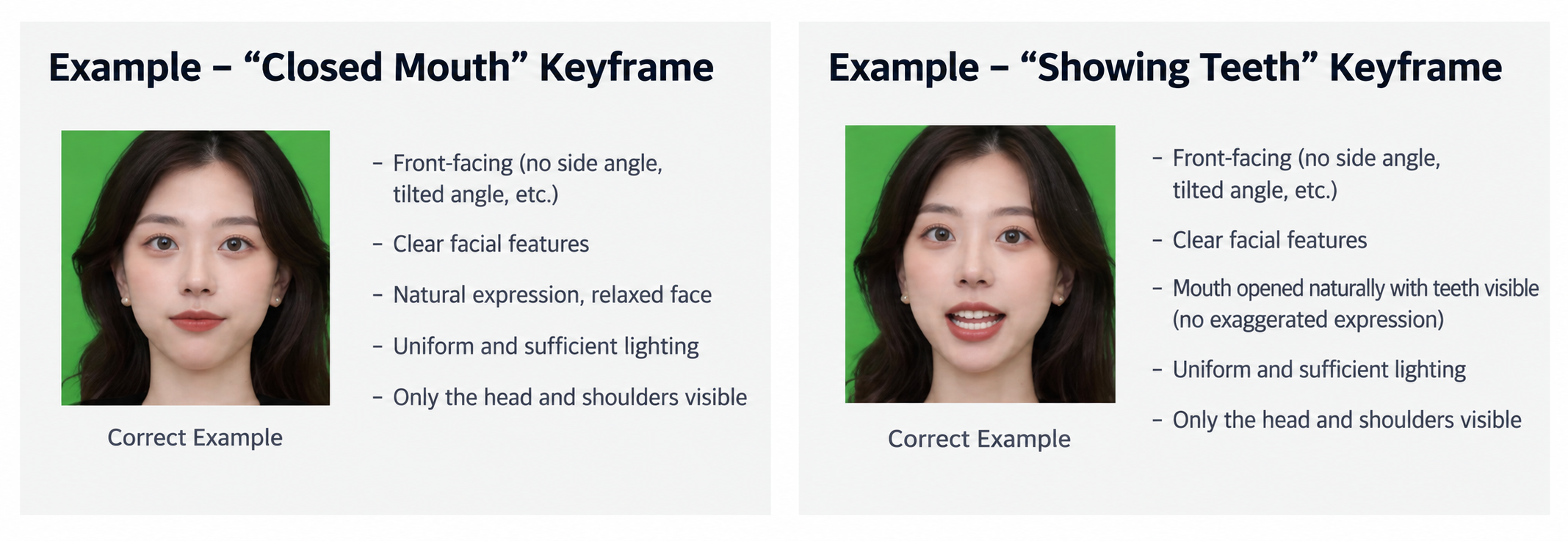
- Body. Slight movement forward, backward, left, or right is fine, as is shifting your seated posture or leaning forward.
Reference for different livestream styles:
Seated livestream style: convey a relaxed or graceful feel while seated; props can be used in hand (looking at the phone, swiping the screen, etc.)
[2.mp4] | [3.mp4] | [4.mp4] | [5.mp4] |
Standing livestream style: bold clothing style with graceful movement, using props in hand (phone, audio equipment)
[6.mp4] | [7.mp4] | [8.mp4] | [9.mp4] | [Syntopia box demo.mp4] |
2. Preparation During Recording
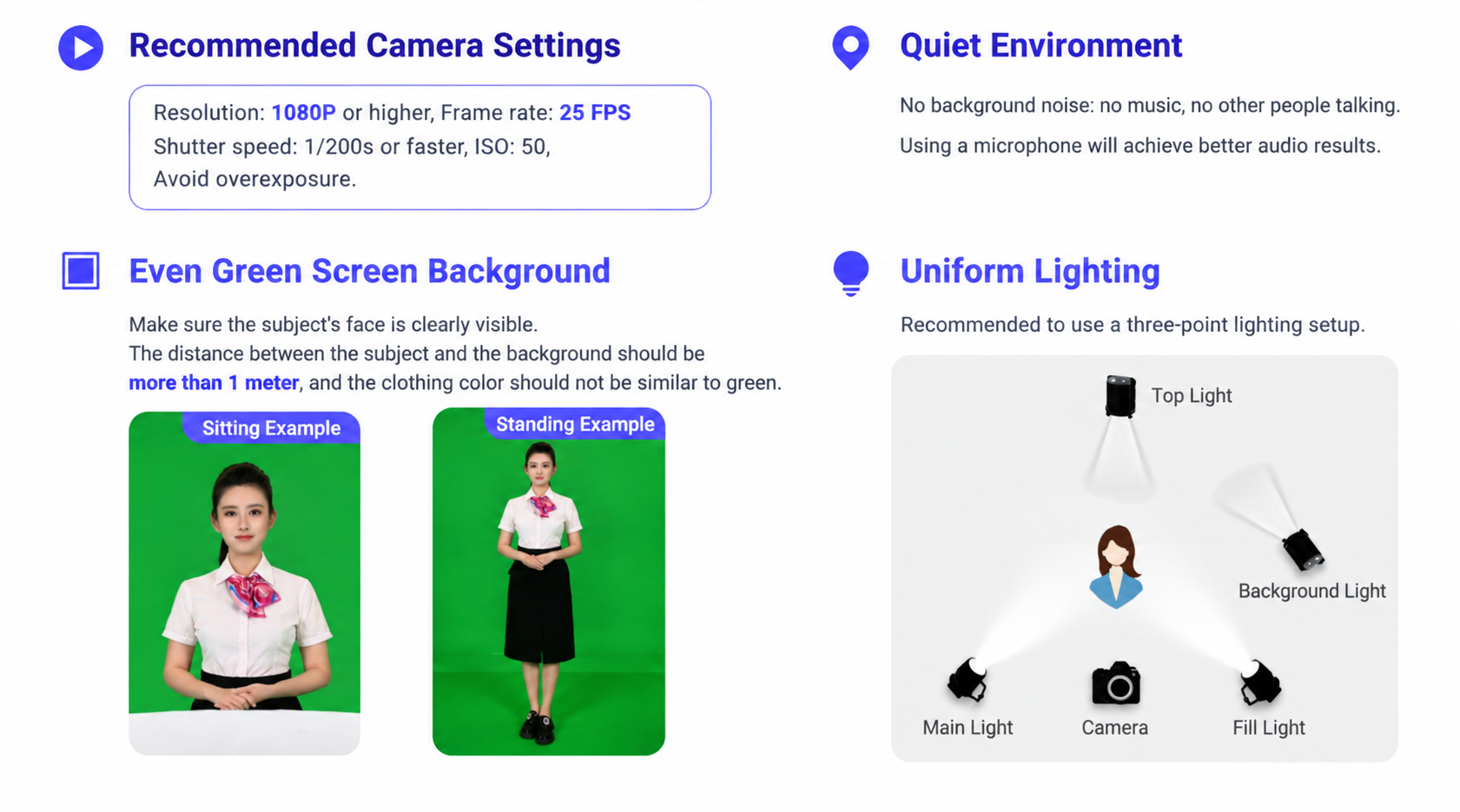
- A studio with a green screen
- A teleprompter is ideal, or the host should be able to pitch products fluently without one
- To highlight lip movement while speaking, women should preferably wear lipstick;
- Hair can be tied up or worn loose, but avoid wispy bangs, stray hair falling across the face, or overly voluminous hairstyles with flyaway strands, as these affect the green-screen keying.
- Choose appropriate clothing. A fitted, solid-color T-shirt or outfit that looks neat and presentable. Do not wear turtlenecks; avoid green or near-green clothing, and avoid clothing with unusual patterns;
- Do not wear earrings, studs, or reflective necklaces; do not wear glasses or colored contact lenses.
- Phone, phone stand, or product samples (e-commerce hosts need to hold sample products)
- Noise-cancelling microphone
- The host should stand 1 meter from the background (to prevent the background color from affecting the result)
- Choose a quiet location, keep the equipment relatively stable, and lock the focus — do not use autofocus
- The host should wear a noise-cancelling microphone
- Video resolution should be 4K to ensure the face is clear
- Video shooting parameters. Frame rate: 25fps; shutter speed: 1/200s or faster (e.g. 1/320s, 1/400s) to avoid motion blur
3. Filming and Recording (5-10 minutes)
- Step 1: Begin with 5 seconds of silent, composed stillness without speaking (no visible teeth, natural expression);
- Step 2: The host performs a livestream in a chosen style for about 5-10 minutes;